Understanding the Content Type JPEG for Web Development
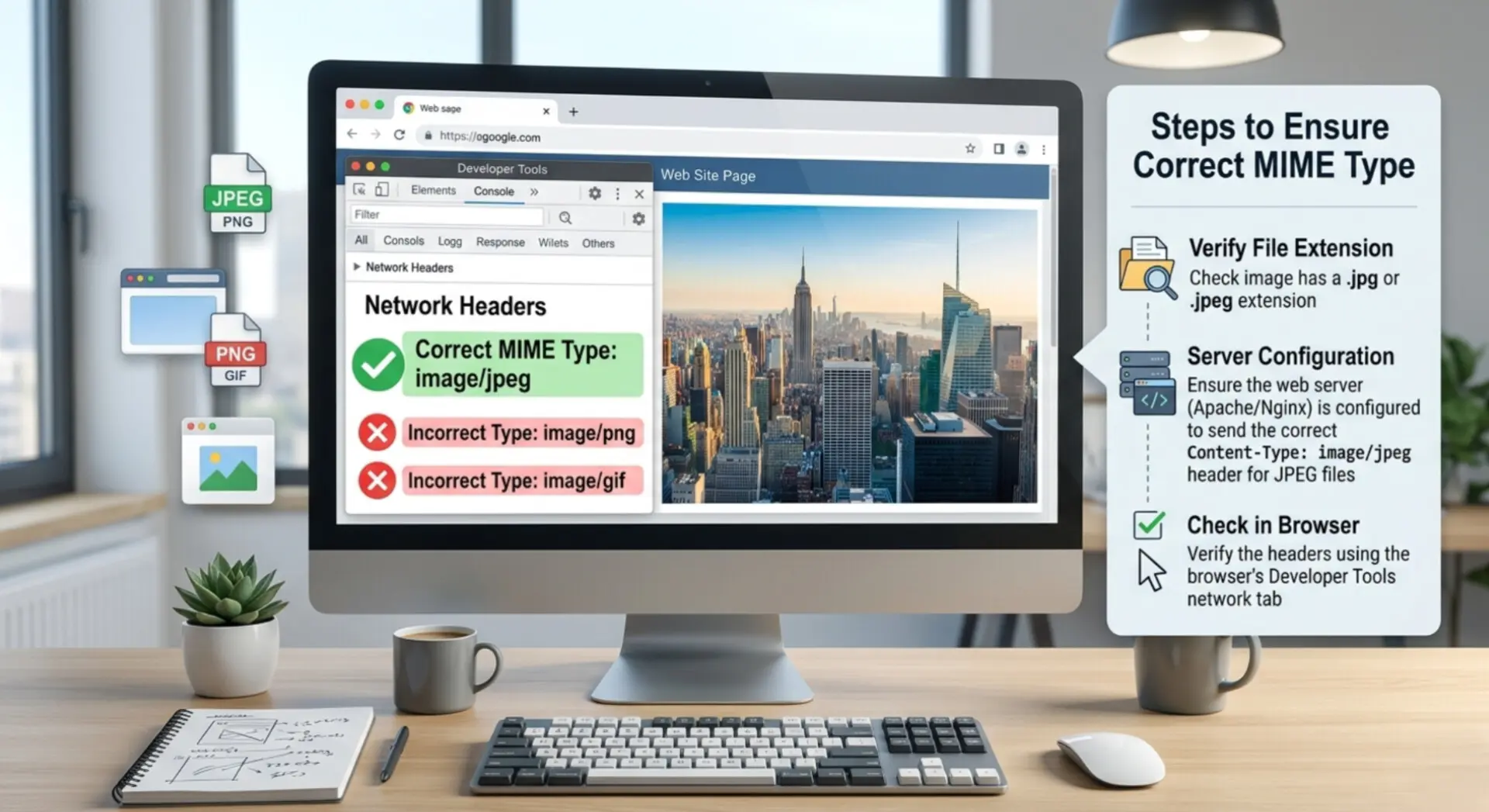 |
| Always use the correct content type jpeg to ensure perfect image rendering. |
What is the correct content type for JPEG?
- Set the header exactly as `Content-Type: image/jpeg` in your server configuration.
- Ensure your upload forms accept this specific MIME type to prevent errors.
- Use backend validation to check the uploaded file and confirm it matches the content type jpeg.
- Configure your Content Delivery Network (CDN) to deliver this exact header format.
- Review your API responses to confirm they do not send generic text labels for images.
- Test your live web pages using browser developer tools to verify the active content type jpeg.
Is image/jpg a valid content type?
- The Common Confusion 📌 Developers often look at the `.jpg` file extension and assume the MIME type matches it. This assumption leads to incorrect server configurations and invalid HTML code.
- Browser Sniffing 📌 When you send an invalid type like `image/jpg`, modern browsers try to guess the real format. This process, called MIME sniffing, slows down the page load slightly.
- Security Risks 📌 Relying on browsers to guess the file format can expose your website to security vulnerabilities, such as Cross-Site Scripting (XSS).
- API Failures 📌 Strict mobile applications and third-party APIs will reject your files completely if you send the wrong content type jpeg.
- Validation Errors 📌 If your upload script looks for `image/jpg`, it will block users who upload standard files using the correct `image/jpeg` signature.
- SEO Impact 📌 Search engine bots prefer clean, valid headers. Serving an invalid format might cause search engines to skip indexing your valuable images.
- Fixing the Error 📌 You can easily fix this by updating your code to use the correct JPEG MIME type across your entire tech stack.
Why is image/jpeg used instead of image/jpg?
- Historical Limitations Early versions of Windows and DOS restricted file extensions to only three characters. Users had to save files as `.jpg` instead of `.jpeg`.
- Macintosh Freedom Apple Macintosh computers never had this three-letter limit. Mac users have always saved their pictures as `.jpeg` natively.
- The Internet Standard When internet engineers created MIME types to identify files over networks, they chose the full acronym (JPEG) rather than the shortened DOS version.
- One Unified Rule Having one single MIME type (`image/jpeg`) prevents confusion. It tells servers and browsers exactly how to decode the image data.
- Consistency Even if your file name ends in `.jpg`, `.jpeg`, or `.jpe`, the actual MIME type for JPG files remains the exact same: `image/jpeg`.
- No Visual Difference The file structure inside the image remains identical. The difference only exists in the text label used for network transport.
Where is the JPEG content type used?
First, web servers like Apache and Nginx use it in HTTP response headers. When a user navigates to your site, your server sends the image file along with a header reading `Content-Type: image/jpeg`. This tells the visitor's device to open the image viewer immediately. Without this, the browser might try to download the file instead of displaying it.
Second, you use it in HTML forms for file uploads. If you want users to upload profile pictures, you write your input tag as ``. This filters out unwanted documents and PDFs. If you only want to allow JPEGs, the content type jpeg acts as your first line of defense. (Note: if you also want to accept PNGs, you must include the correct MIME type for PNG, which is `image/png`).
Third, developers use it heavily in API development. When you build a mobile app that fetches data from a database, the REST API must declare the image format. Mobile apps are very strict. If an iOS or Android app receives a picture without the exact content type jpeg, the app will likely crash or show a broken image icon.
Do all browsers support image/jpeg?
Yes, all modern and legacy web browsers fully support the `image/jpeg` content type. Browsers are built specifically to handle this format with high efficiency and speed. When you provide the correct label, you unlock the most advantages of JPEG, including fast rendering and low memory usage.
- Google Chrome 👈 Chrome processes the content type jpeg instantly, applying its powerful caching engine to load returning visits faster.
- Mozilla Firefox 👈 Firefox reads the `image/jpeg` header and renders the colors exactly as the photographer intended, adhering to strict color profiles.
- Apple Safari 👈 Safari uses native Apple rendering to display the content type jpeg smoothly on iPhones and MacBooks while saving battery life.
- Microsoft Edge 👈 Edge handles `image/jpeg` flawlessly, integrating well with Windows OS native image libraries for rapid display.
- Mobile Browsers 👈 Every mobile browser on Android and iOS requires the exact content type jpeg to resize and paint images on small screens efficiently.
- Email Clients 👈 Even web-based email clients like Gmail and Outlook rely on the `image/jpeg` MIME type to display inline image attachments safely.
How to Implement Content Type JPEG in HTML and HTTP Headers
- HTML Upload Forms When building a form, use the `accept` attribute. Write ``. This forces the browser's file picker to only highlight valid JPEG images, creating a better user experience.
- Apache Server (.htaccess) If your server fails to send the right headers, you can force it using Apache. Add `AddType image/jpeg .jpg .jpeg` to your `.htaccess` file. This guarantees every JPEG file uses the correct content type jpeg.
- Nginx Server Configuration For Nginx users, open your `mime.types` file. Ensure the line reads `image/jpeg jpeg jpg jpe;`. This maps all relevant file extensions to the single valid MIME type.
- PHP File Uploads In PHP, never trust the `$_FILES['image']['type']` blindly, as users can fake it. Instead, use `mime_content_type()` or the `finfo_file` function to scan the actual file contents and verify it returns `image/jpeg`.
- Node.js and Express When sending an image through a Node API, explicitly set the header. Use `res.setHeader('Content-Type', 'image/jpeg');` before sending the file buffer. This stops client-side rendering bugs.
- Amazon S3 and Cloud Storage When uploading files to AWS S3, always define the metadata. Set the `ContentType` parameter to `image/jpeg`. If you forget this, S3 might default to `application/octet-stream`, forcing browsers to download the image.
- Using Fetch API (Frontend) If your JavaScript sends an image via a POST request, include the header. Set `headers: { 'Content-Type': 'image/jpeg' }` if you are sending raw binary image data.
- Email Development When building HTML emails with embedded images (CID), the MIME part for the image must declare `Content-Type: image/jpeg; name="photo.jpg"`. This ensures the image displays inside the email body instead of as a random attachment.
Common Mistakes When Using Content Type JPEG
Even experienced developers make mistakes when handling the content type jpeg. These errors can lead to broken layouts, wasted bandwidth, and frustrated users. Knowing what to avoid is just as important as knowing what to do. You must review your code to ensure you do not fall into these common traps.
One of the biggest mistakes is trusting the client-side data. Browsers send a MIME type when a user uploads a file, but hackers can manipulate this data easily. Always verify the content type jpeg on the server side by scanning the file's binary signature. The first few bytes of a true JPEG file always contain the "magic number" hex value `FF D8 FF`. Your server code must look for this signature.
Another frequent error is mixing up different image formats in your database. If a user uploads a PNG, but your database saves the metadata as `image/jpeg`, your server will send conflicting headers. The browser will receive a PNG file but a JPEG header. While Chrome might figure it out, strict applications will fail. To avoid this, use reliable image formatting tools to normalize all user uploads into one standard format before saving them.
Finally, avoid hardcoding headers in dynamic routing. If you have a script that serves multiple types of images, do not write a static `Content-Type: image/jpeg` header for every route. Build a dynamic function that checks the file extension or file signature, and outputs the correct MIME type accordingly. This keeps your application flexible and bug-free.
By avoiding these mistakes, you ensure that your web application runs smoothly. The content type jpeg is a simple string of text, but its impact on web security, performance, and user experience is massive. Treat it with the technical respect it deserves.
The Role of Content Type JPEG in SEO and Performance
- Clear communication with search engines.
- Faster indexing of new visual content.
- Prevention of soft 404 errors.
- Better browser caching mechanisms.
- Improved Core Web Vitals scores.
- Reduction in server processing time.
- Enhanced accessibility for screen readers.
Furthermore, proper implementation of MIME types protects your servers from security threats and ensures search engines can index your visual content without errors. Take the time to audit your HTML forms, server configurations, and API endpoints. Consistent use of the correct content type jpeg will result in a faster, safer, and more professional digital presence.
Make Every Image Work for You
Stop dealing with incompatible formats and oversized files. With Image Converter 24, you can instantly transform your images into the format you need — optimized, lightweight, and ready to use anywhere.
Convert Images Now