Is image/jpg a valid MIME type or should it be image/jpeg?
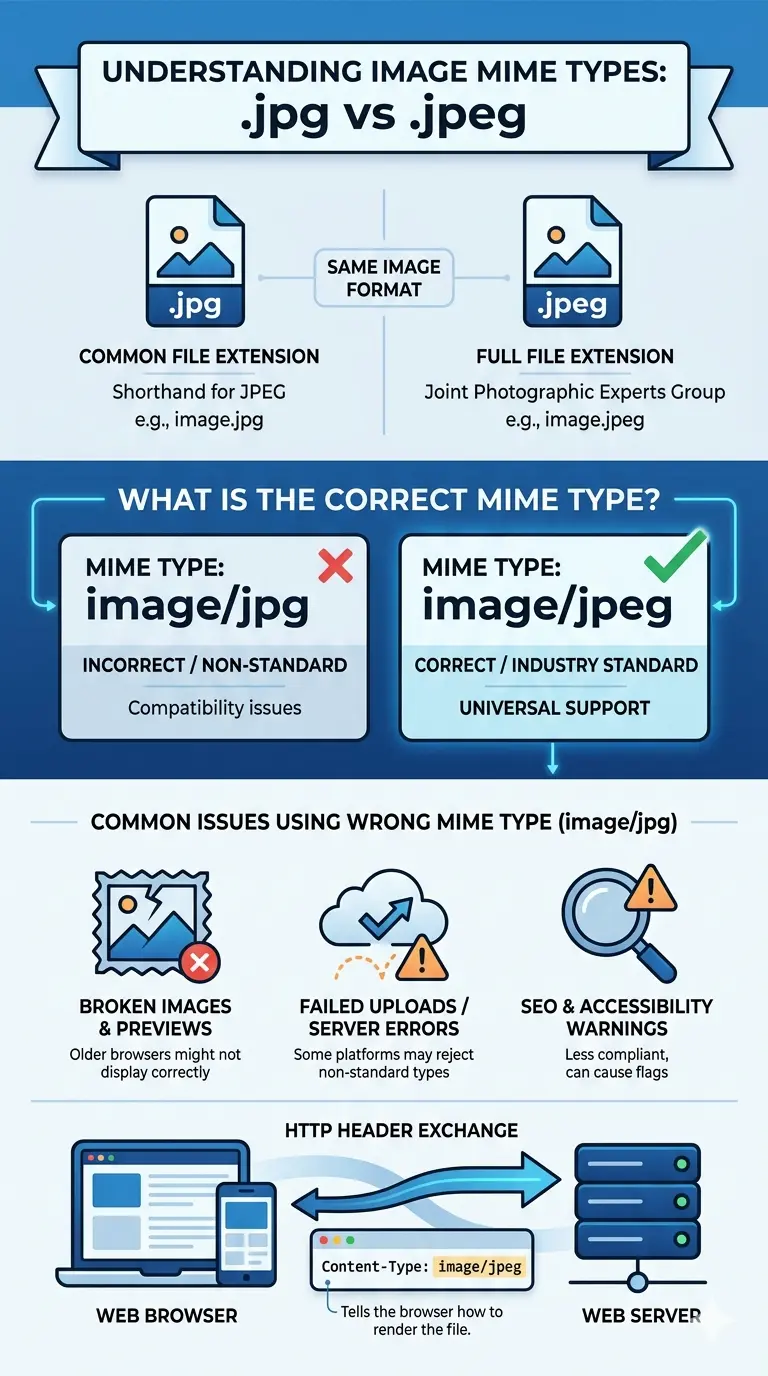 |
| Understanding the difference between file extensions and official MIME types. |
Is image.JPG a valid MIME type?
Using image/jpg instead of image/jpeg can cause some legacy browsers or strict API integrations to fail. Always stick to the IANA standards for maximum compatibility.
- Always use image/jpeg in your HTTP headers.
- Configure your server (Apache or Nginx) to map .jpg extensions to the image/jpeg type.
- Double-check your HTML5 code, specifically when using the
<source>tag in picture elements. - Use a reliable tool like free unlimited image converter to ensure your files are properly formatted before uploading.
- Avoid using custom or made-up MIME types in your backend code.
- Monitor your site's "Console" in Developer Tools to see if the browser is throwing "MIME type mismatch" warnings.
Does JPG count as JPEG?
Regardless of your file extension — .jpg, .jpeg, .jpe, or .jfif — the server should always report it to the browser as image/jpeg.
What is the MIME type of image?
image/ followed by the specific format. This is crucial for web performance and security.
- JPEG: Use
image/jpeg. This is the global standard for photographs. - PNG: Use mime type for png, which is
image/png. Essential for transparent backgrounds. - WebP: The modern standard is
image/webp. It provides better compression than JPEG. - GIF: The standard for simple animations is
image/gif. - SVG: For vector graphics, use
image/svg+xml.
image/jpeg header—most modern browsers will try to correct it. However, this triggers "MIME Sniffing," which is a security risk. Hackers sometimes hide malicious scripts inside image files, hoping the browser will misinterpret the type and execute the script. By being precise with your MIME types, you are actually making your website more secure.Is JPEG an image type?
When serving images via a CDN or a custom backend, check your 'Content-Type' header. It must strictly say image/jpeg. Avoid variations like image/x-citrix-jpeg unless you have a very specific enterprise reason.
Practical Implementation: Setting the Right Type
- Apache Servers: Use an
.htaccessfile to map extensions correctly. Add the line:AddType image/jpeg .jpg .jpeg. - Nginx Servers: Ensure your
mime.typesfile includes the mapping:image/jpeg jpg jpeg;. - HTML5 Picture Tag: When using multiple formats, specify the type clearly:
<source srcset="img.jpg" type="image/jpeg">. - Node.js/Express: Use the
res.type('image/jpeg')method when sending image buffers. - Python/Django: Use
content_type="image/jpeg"in your FileResponse or HttpResponse objects.
image/jpeg header, you reduce the workload on the user's browser, leading to faster paint times and a better Core Web Vitals score.Common Mistakes to Avoid
- Using image/jpg: As discussed, this is the #1 mistake. It is not an IANA-approved type.
- Relying on Browser Autocorrect: Just because it looks okay on your Chrome browser doesn't mean it works on Safari, Firefox, or embedded browsers in apps like Instagram.
- Ignoring the 'type' attribute: In HTML, the
typeattribute helps the browser decide which image to download *before* it downloads it. If you puttype="image/jpg", a browser might skip that source entirely. - Mismatched Extensions: Renaming a .png file to .jpg without actually converting the data. This creates a file that says it's a JPEG but has PNG data inside. This is a nightmare for MIME consistency.
Never just rename a file extension manually. Use a real conversion tool to change the underlying data structure, otherwise your MIME types will always be technically incorrect.
The Future of MIME Types and Images
The web is moving fast. While we are still debating image/jpeg vs image/jpg, new formats are taking over. AVIF and WebP offer much better efficiency. However, even as we adopt these new technologies, the lessons remain the same: standards matter. Always check the official documentation before implementing a new format.
If you are managing a large library of images, you might feel overwhelmed by these technical requirements. The best approach is to automate. Use scripts or tools that automatically verify the integrity of your images and set the headers for you. This allows you to focus on creating great content while your infrastructure handles the heavy lifting of standards compliance.
If you are unsure what MIME type your server is currently sending, use a tool like "cURL" or the "Network" tab in your browser's inspect tool. Look for the Content-Type header in the response.
FAQs: Your Questions Answered
A: In 95% of cases, no. Modern browsers are very forgiving. However, it can break specialized software, old browsers, and certain SEO crawlers.
A: The IANA (Internet Assigned Numbers Authority) is the official registry. They list
image/jpeg as the only standard for JPEG images.A: No, that is not necessary. The file extension can be .jpg, but the *MIME type* (the header) must be
image/jpeg.A: Yes! Email clients are often much stricter than web browsers. Using the correct MIME type ensures your images appear in the recipient's inbox rather than as broken attachments.
A: No. MIME types are just labels. They do not affect the pixels or the compression of the image itself.
Conclusion: Stay Standard, Stay Successful
image/jpeg, you are choosing compatibility, security, and performance.Convert Your Images the Smart Way
In today’s fast-paced digital world, images are everywhere — on websites, in presentations, across social media, and within your projects. But dealing with large or incompatible image formats can slow down your workflow, create storage issues, and waste valuable time.
Image Converter 24 was designed to solve exactly this problem. For TIFF archives, PNG graphics, high-resolution JPGs, or WebP images for the web images for the web, you can convert them instantly without installing any software. The entire process happens directly in your browser, keeping your workflow seamless and efficient.
Beyond speed and convenience, Image Converter 24 ensures your images retain their quality, making it perfect for professionals, creatives, and anyone who values precision. With unlimited conversions and a user-friendly interface, your digital projects will always look their best — no technical headaches required.