JPEG 2000 vs JPEG Stereo Full Comprehensive Comparison
Published April 08, 2026 by Admin
Updated September 27, 2026
Views 612
Table of contents
JPEG 2000 vs JPEG Stereo
Understanding image formats can feel like learning a new language. When you dive into the world of digital photography, archiving, or 3D imaging, you will encounter many file types. Two formats that often cause confusion are JPEG 2000 and JPEG Stereo. While they share the "JPEG" name, they serve completely different purposes. To make the best decision for your projects, you need a clear technical comparison between jpeg 2000 vs jpeg stereo. This guide will break down the purpose of each format, image quality, compression methods, and software compatibility. By the end of this article, you will know exactly which format fits your specific needs and how to manage these files effortlessly.
JPEG 2000 vs JPEG Stereo
💡 Important Tip: Before choosing an image format, always define your end goal. If you want to create 3D visual experiences, look into stereo formats. If you need flawless, medical-grade image archiving, look into advanced compression formats like JPEG 2000.
What does stereo image mean?
A stereo image refers to a technique that creates an illusion of 3D depth from a given 2D image. The concept relies on how human vision works. Our eyes are positioned slightly apart, meaning each eye sees the world from a slightly different angle. The brain combines these two different views to perceive depth. In digital imaging, a stereo image mimics this biological process. It consists of two slightly offset images shown separately to the left and right eye. When viewed through special glasses, VR headsets, or stereoscopic displays, the brain merges them into a single three-dimensional scene.
What is a stereo photograph?
A stereo photograph is the actual picture created using the stereoscopic method. Photographers create these images by using a specialized camera with two lenses or by taking two photos sequentially with a standard camera shifted slightly to the side. These photographs capture the exact same subject at the exact same moment, but from two perspectives. Historically, people viewed these through classic stereoscopes. Today, modern technology allows us to view stereo photographs on 3D televisions, virtual reality headsets, and even certain smartphones.
What is a JPEG stereo?
A JPEG Stereo file, often carrying the .jps file extension, is the standard digital format for storing stereoscopic photographs. Simply put, it is a single file that contains two standard JPEG images placed side-by-side. When you open a JPEG Stereo file in a standard image viewer, it will just look like two nearly identical photos glued together. However, when you open it in 3D viewing software, the program splits the image down the middle and feeds the left image to your left eye and the right image to your right eye. If you want to understand how this format compares to standard images for daily use, you can read more about jpeg stereo vs jpeg to see the practical differences.
⚠️ Warning: Do not try to upload a .jps file directly to standard social media platforms like Instagram or Facebook. They will not recognize the 3D data and will simply display the image as a weird, side-by-side double picture.
What is JPEG 2000 used for?
Unlike JPEG Stereo, which is all about 3D viewing, JPEG 2000 (often seen as .jp2 or .j2k) is a highly advanced image compression standard. Created by the Joint Photographic Experts Group in the year 2000, it was designed to supersede the original JPEG format. JPEG 2000 is used primarily in professional and high-stakes environments. You will rarely find it on personal blogs or social media. Instead, it dominates specific professional industries:
Medical Imaging 📌 Hospitals use JPEG 2000 for MRI and X-ray scans because it offers flawless lossless compression, ensuring no diagnostic data is lost.
Digital Cinema 📌 Movie theaters receive films in a format called DCP (Digital Cinema Package), which uses JPEG 2000 to compress individual movie frames at extreme resolutions.
Archival Storage 📌 Museums and historical societies use it to digitize historical documents and artwork because it handles massive resolutions and deep color profiles perfectly.
Satellite Imaging 📌 Space agencies and mapping software use this format to handle massive aerial photographs smoothly.
Comparing the Core Features
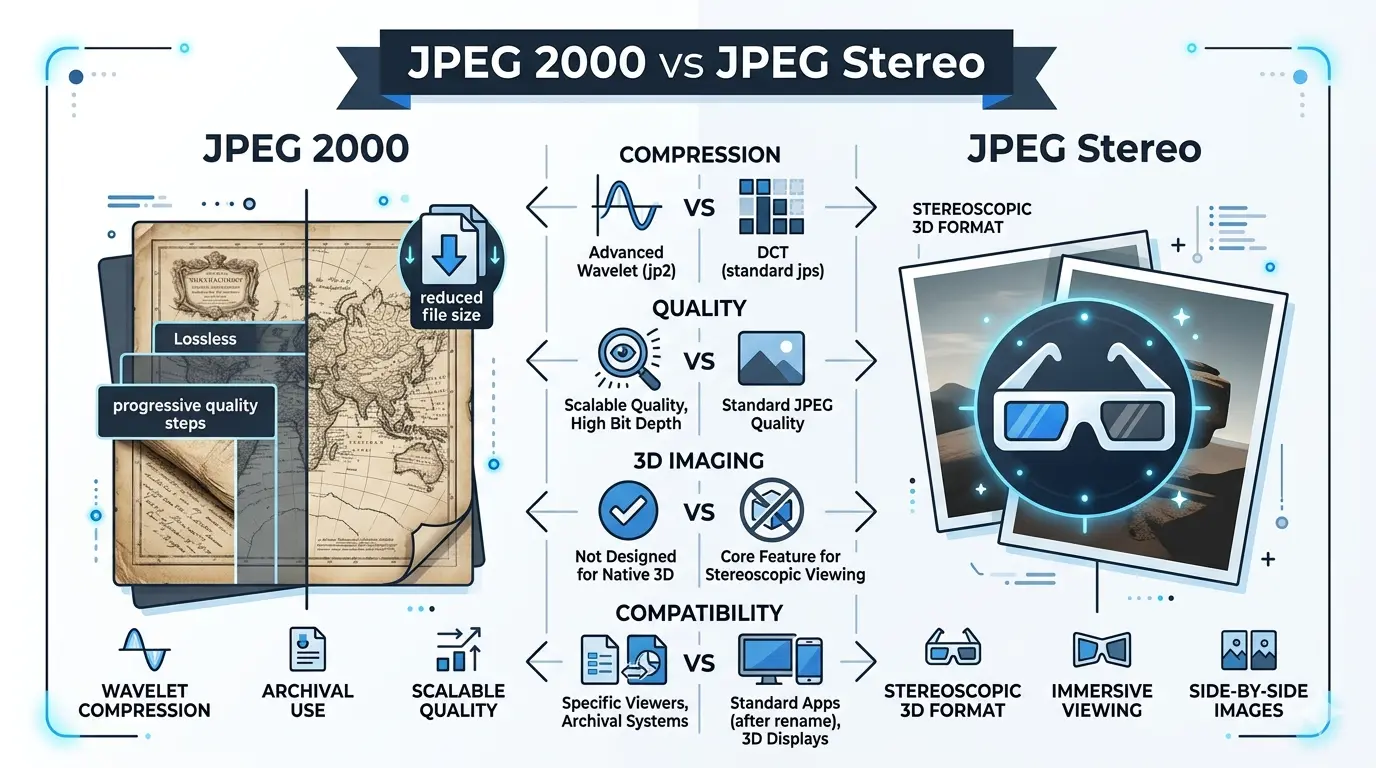
To truly grasp the jpeg 2000 vs jpeg stereo debate, we must look at them side by side. They are built for entirely different purposes, but comparing their technical traits helps clarify their ideal use cases.
Feature
JPEG 2000 (.jp2)
JPEG Stereo (.jps)
Primary Purpose
🏥 Archiving, medical imaging, cinema
🕶️ 3D / stereoscopic photos
Compression Method
🌊 Wavelet transform
🖼️ Standard DCT (JPEG)
Image Quality
✨ Superior + lossless support
👍 Good, but JPEG artifacts
3D Support
❌ No native 3D
✅ Native stereoscopic
Web Browser Support
🍎 Mostly Safari
🌍 Basic side-by-side support
File Size
📦 Large (HDR + high res)
📁 Small–medium (~2× JPEG)
Is JPEG 2000 better quality than JPEG?
Yes, JPEG 2000 offers significantly better image quality than a standard JPEG. The secret lies in the mathematics used to compress the file. Standard JPEGs use a method called Discrete Cosine Transform (DCT). When you compress a standard JPEG too much, you see ugly, blocky squares in the image. These are called compression artifacts. JPEG 2000 uses a different method called Wavelet compression. Instead of breaking the image into blocks, it compresses the image as a continuous wave. Even at high compression rates, a JPEG 2000 image simply looks slightly softer or blurred, rather than pixelated and blocky. Furthermore, JPEG 2000 supports true mathematically lossless compression. This means you can compress the file to save space, but when you open it, every single pixel is exactly as it was in the original source. Standard JPEG cannot do this.
Is JPEG 2000 intraframe?
Yes, JPEG 2000 operates as an intraframe compression codec, particularly when used in video formats like Motion JPEG 2000. In video production, codecs are either interframe or intraframe. Interframe codecs (like MP4/H.264) save space by only recording the changes between frames. This is great for streaming but terrible for video editing. Intraframe compression treats every single frame of the video as a separate, complete image. Because JPEG 2000 compresses every frame individually, it requires more storage space. However, it provides perfect quality and frame-accurate editing. This is exactly why the digital cinema industry relies on JPEG 2000 to project movies on massive theater screens.
💡 Important Tip: If you are a video editor working with high-end cinema footage, intraframe codecs like Motion JPEG 2000 will make your timeline playback much smoother because your computer doesn't have to calculate the differences between frames on the fly.
Is JPEG 2000 still used?
Despite its age, JPEG 2000 is still heavily used today, but it remains hidden from the average consumer. You will not find it used for website backgrounds, email attachments, or smartphone photography. However, it is the absolute backbone of several critical industries. Medical professionals rely on the DICOM standard, which wraps medical scans in JPEG 2000 compression. The Library of Congress uses it to archive fragile historical documents. Digital cinemas worldwide use it exclusively for movie projection. So, while it lost the battle for the consumer web, it won the war for professional archiving and medical imaging.
What are the disadvantages of JPEG 2000?
If the quality is so great, why doesn't everyone use it? JPEG 2000 has several notable disadvantages that prevented it from replacing the standard JPEG:
High Processing Power Required Wavelet compression is mathematically complex. It takes significantly more CPU power and RAM to encode and decode a JPEG 2000 image compared to a standard JPEG. In the early 2000s, everyday computers and digital cameras simply could not handle it.
Lack of Browser Support Google Chrome, Mozilla Firefox, and Microsoft Edge never adopted native support for JPEG 2000. Currently, only Apple's Safari browser supports it natively. Building a website with JP2 images guarantees that most of your visitors will see broken image links.
Patent and Licensing Issues When the format was first released, there was confusion and fear regarding patent royalties. Software developers avoided integrating it into free software to avoid potential lawsuits.
Incompatible Hardware Very few consumer cameras offer the ability to shoot in JPEG 2000. They usually offer RAW and standard JPEG formats.
Is JPEG 2000 good for printing?
JPEG 2000 is exceptionally good for professional printing. Standard JPEGs only support 8-bit color depth, which can sometimes result in color banding (visible lines where colors should transition smoothly, like in a clear blue sky). JPEG 2000 supports up to 38-bit color depth and high dynamic range. It handles transparency (alpha channels) and can embed rich ICC color profiles. This ensures that the colors you see on your calibrated monitor will match exactly what the commercial printer produces. If you are a fine art photographer sending a massive, highly detailed file to a print lab, JPEG 2000 is a fantastic choice, provided the lab's software accepts it.
Which JPEG quality is the best?
When discussing the JPEG family, "best" depends on how you measure quality. If you measure quality strictly by color accuracy, lack of compression artifacts, and dynamic range, then lossless JPEG 2000 holds a very high rank. However, technology has evolved. Newer formats have been developed to fix the flaws of both standard JPEG and JPEG 2000. Formats like HEIC (used by Apple) and WebP (created by Google) offer amazing quality at tiny file sizes. But in terms of pure, uncompromised, archival quality within the JPEG family tree, an uncompressed or lossless JPEG 2000 file provides unparalleled fidelity.
⚠️ Warning: Do not confuse "image quality" with "web performance". A massive, lossless JPEG 2000 file might look perfect, but if it takes 15 seconds to load on a webpage, it provides a terrible user experience. Always balance quality with file size.
Is JPEG XL better than JPEG 2000?
Yes, for almost all modern applications, JPEG XL is considered vastly superior to JPEG 2000. JPEG XL is the newest standard designed to finally replace the old JPEG format. JPEG XL offers better compression efficiency, meaning the files are smaller than JPEG 2000 while maintaining the same flawless visual quality. Furthermore, JPEG XL is completely royalty-free and open-source, eliminating the legal fears that hindered JPEG 2000. It also has a unique feature: it can take existing standard JPEGs and compress them further without losing any additional quality. If you are a web developer or a photographer looking to future-proof your gallery, you should highly consider modern formats. For a deeper dive into this specific topic, check out the detailed comparison between jpeg2000 vs jpeg xl to see why the industry is shifting.
Which format is best for photos?
Choosing the best format for your photos comes down to your audience and your goals. Let's summarize the best practices:
For Web and Social Media: Stick to standard JPEG or WebP. They load incredibly fast and are universally supported across all devices, browsers, and apps.
For 3D Enthusiasts and VR: Use JPEG Stereo (.jps). It is the standard way to store and view stereoscopic 3D images on specialized hardware.
For Professional Medical and Cinema: JPEG 2000 (.jp2) remains the gold standard. It provides the mathematical precision required for these industries.
For Future-Proof Archiving: Keep an eye on JPEG XL. It combines the lossless quality of JP2 with modern efficiency and better broad support potential.
For Photography Editing: Always shoot in RAW. RAW files contain all the uncompressed light data from your camera's sensor, giving you maximum flexibility during editing. Once edited, export to the format that suits your delivery method.
How to easily convert these formats
Dealing with specialized formats like JPEG Stereo and JPEG 2000 can be frustrating if you don't have the right software installed on your computer. If a client sends you a .j2k medical scan, or a .jps 3D image, you might not be able to open it with your default computer photo viewer. You do not need to download heavy, expensive software to solve this problem. You can quickly and securely convert these complex file types into standard, web-friendly formats directly from your browser. To make your workflow smooth and hassle-free, we highly recommend using a dedicated, fast tool like Image Converter 24. It allows you to transform heavy professional formats into standard images in just a few clicks, saving you time and technical headaches.
Conclusion: Ultimately, the comparison of jpeg 2000 vs jpeg stereo proves that image formats are tools built for very specific jobs. JPEG Stereo brings the magic of 3D depth to our screens, offering immersive experiences for VR and 3D displays. Meanwhile, JPEG 2000 handles the heavy lifting in the background of our hospitals, cinemas, and archives, preserving vital data with incredible precision. Understanding the strengths and weaknesses of these formats empowers you to make smarter decisions for your digital media. Whether you are archiving precious history, projecting a blockbuster movie, or just trying to convert a stubborn file to post online, knowing the technology behind the image ensures you get the highest quality result every single time.
A Smarter Way to Handle Your Images Online
Working with images has become a daily task for creators, website owners, students, marketers, and professionals across every industry. From preparing visuals for blog posts and presentations to optimizing media for faster websites and social sharing, the need for a reliable image tool is more important than ever. The challenge, however, is that different platforms require different file formats, sizes, and quality settings. This often forces users to switch between multiple tools, install extra software, or spend unnecessary time managing files.
Image Converter 24 was built to simplify this entire process. Instead of dealing with complicated desktop applications or limited online tools, you can convert, optimize, and manage your images directly from your browser in just a few clicks. Whether you need to switch between PNG, JPG, WebP, TIFF, or other popular formats, the experience remains fast, smooth, and intuitive.
Beyond simple conversion, having one centralized place to manage image tasks can dramatically improve your workflow. You save time, reduce friction, and keep your focus on the actual work that matters — whether that’s publishing content, building a website, creating client assets, or preparing files for documentation.
What makes the experience even better is the flexibility. There are no unnecessary steps, no software installations, and no learning curve. Everything is designed to be accessible, fast, and efficient, making it suitable for both beginners and professionals who simply want dependable results without complexity.