Professional PNG to JPEG Converter | High Quality Images
Convert PNG images to JPEG online safely, quickly, and without losing quality
- Home
- PNG to JPEG
Drag & Drop up to 20 File(s) Here
ORMax size is 10 MB
The file will be deleted after 1 hour(s).
PNG to JPEG Converter: Free, Instant and Online
Image Converter 24 is a free online PNG to JPEG converter. Upload one or more PNG files (up to 10 MB each), click Convert, and download your JPEGs one by one or all together as a ZIP file. No registration or software is needed, and uploaded files are deleted after 1 hour.
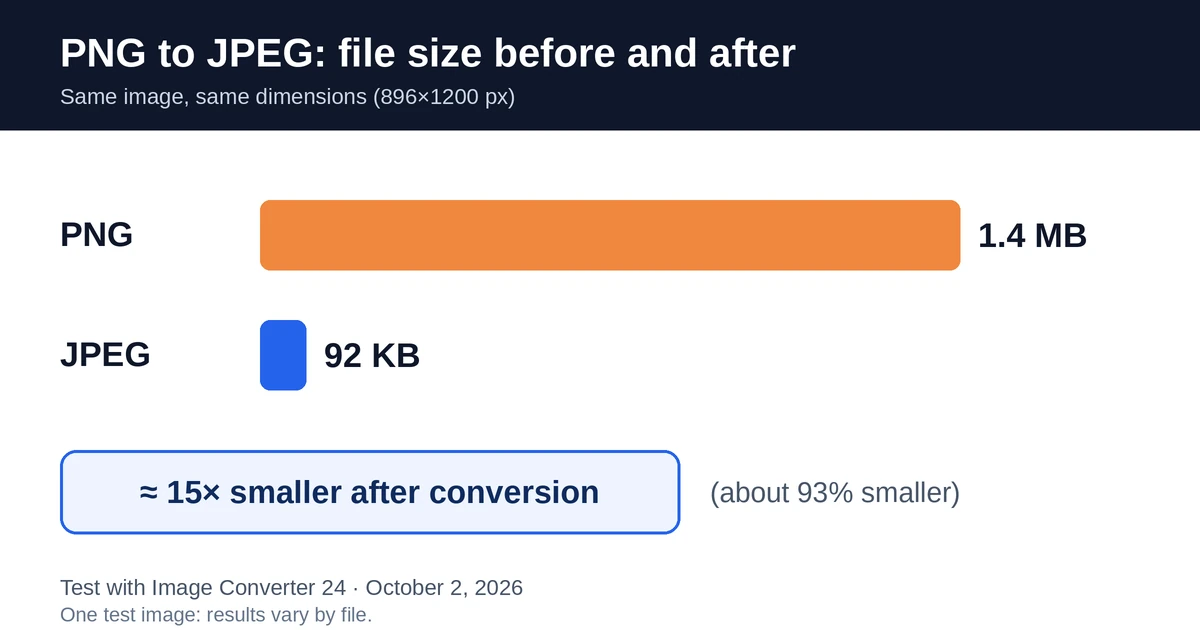
Quick answer: Upload your PNG, convert it, and download the JPEG. JPEG files are usually much smaller than PNG photos, but JPEG does not support transparency. In our test, a 1.4 MB PNG became a 92 KB JPEG.
How do I convert PNG to JPEG online?
Upload your PNG, click Convert, then download the JPEG. It is an easy, instant PNG to JPEG conversion that takes a few seconds, works in any modern browser, and also works on iPhone and Android.
- Upload your PNG file, or select multiple files (maximum 10 MB each).
- Click Convert.
- Download your JPEG file.
Bulk PNG to JPEG: how to convert many files at once
You can convert PNG to JPEG in bulk. Select several PNG files when you upload them (each up to 10 MB), click Convert once, and download each JPEG separately or all of them together in one ZIP file. This fast batch conversion saves time when you have many product photos, screenshots, or images for a presentation.
How do I convert PNG images to JPEG on my iPhone?
Open this page in Safari or Chrome, choose the PNG from your Photos or Files, tap Convert, and download the JPEG. No app is required on iPhone or Android. The converted file is saved to your Downloads folder (on iPhone, in the Files app), and depending on your device it may also appear in your Gallery. On iPhone you can also use the Shortcuts app with its Convert Image action.
- Open this page in Chrome, Safari, or another browser.
- Tap the upload area and choose a PNG from your photos or files.
- Tap Convert, then Download.
How to convert PNG to JPEG on Windows or Mac
You can also convert without any website, using free tools already on your computer.
How to convert PNG to JPEG on Windows (Paint)
Open the PNG in Paint, click File > Save as, and choose JPEG picture. Name the file and save.
How to convert PNG to JPEG on Mac (Preview)
Open the PNG in Preview and click File > Export. Choose JPEG from the Format menu, adjust the Quality slider, and save.
Does converting PNG to JPEG lose quality?
Yes, a little. JPEG uses lossy compression, so converting a PNG to JPEG discards some image data to make the file smaller. For photos at a high quality setting the difference is usually hard to see, but sharp text, thin lines, and flat-color graphics can show blurry edges or small artifacts. JPEG also cannot keep transparency. Keep your original PNG in case you need it later.
- Start from the original PNG, not a copy that was already compressed or shared through a messaging app.
- Avoid converting the JPEG back to PNG expecting to recover detail, because lost detail does not come back.
- Keep the original size. Enlarging an image does not add detail.
PNG to JPEG test: file size before and after
Our test: We converted an 896×1200 pixel PNG photo of 1.4 MB with this tool. The resulting JPEG was 92 KB, about 15 times smaller (roughly 93% less), with the same dimensions. Test date: October 2, 2026. This is one sample: results vary with the image, and simple graphics with flat colors can behave differently from photos.

PNG vs JPEG: what is the difference?
JPEG and PNG are two different image formats. JPEG uses lossy compression for small files and suits photos. PNG uses lossless compression, supports transparency, and suits logos, screenshots, and graphics.
| Feature | JPEG | PNG |
|---|---|---|
| Compression | Lossy | Lossless |
| Transparency | No | Yes |
| File size | Smaller | Usually larger for photos |
| Best for | Photos, web pages, email | Logos, screenshots, graphics, editing |
| Quality after re-saving | Drops each time | Stays the same |
Is PNG better quality than JPEG?
PNG keeps every pixel exactly and does not lose quality when saved again, while JPEG loses a little each time. That makes PNG the better choice for graphics, text, and images you edit often. For photos, a high-quality JPEG looks almost the same at a much smaller size.
Which image is best, PNG or JPEG?
- Photos for web, email, and social media: JPEG, because the files are smaller.
- Logos, icons, screenshots, and text in the image: PNG, because edges and letters stay sharp.
- Images with a transparent background: PNG, because JPEG does not support transparency.
Can I use PNG instead of JPEG?
Often yes, because most websites, apps, and editors accept both. But PNG photos are usually much larger, which makes uploads and page loads slower, and some forms, platforms, or print services accept only JPEG. Convert to JPEG when a size or format limit applies.
Are PNG and JPEG the same?
No. They are different formats with different compression. JPEG is lossy and PNG is lossless. JPEG is sometimes written as JPG, and those two are the same format: only the file extension changes.
What are the disadvantages of a PNG?
- Larger files for photos, which are slower to upload, send, and load.
- No CMYK support, which some print shops ask for.
- Less practical for email attachments and pages that must load fast.
For websites: use JPEG for photos and banners, and PNG for logos, icons, and anything that needs transparency. See PNG vs JPEG for websites: which format is better.
For printing: resolution matters more than format, so aim for about 300 pixels per inch at the printed size. Converting to JPEG does not add pixels, and PNG does not support CMYK, so check with your print shop first if they ask for CMYK files. More in our guide on whether PNG or JPEG is better for printing. To weigh the format itself, read the advantages and disadvantages of JPEG.
When should you convert PNG to JPEG?
- You need a smaller file for a website, email, or upload limit.
- A platform, form, or app asks for a JPEG file.
- The image is a photo and does not need transparency.
If the image has transparency, sharp text, or flat-color graphics, keep the PNG.
PNG to JPEG: common questions
Can I turn a PNG into a JPEG?
Yes. Upload the PNG to this converter, click Convert, and download the JPEG. No editing or software is needed.
What happens to transparency when I convert PNG to JPEG?
JPEG does not support transparency, so transparent areas are filled with a solid color. If the background color matters, check the result, or place the image on the background you want in an image editor before converting.
Does PNG to JPEG always make the file smaller?
Usually for photos, but not always. Simple graphics and screenshots with few colors can stay about the same size or even grow. If size is your goal, compare the files after converting.
Can I convert a PNG larger than 10 MB to JPEG?
Each file can be up to 10 MB. If your PNG is larger, reduce its size or dimensions in an image editor first, then convert it.
Can I convert the JPEG back to PNG?
Yes, but the PNG will not recover the detail JPEG compression already removed, and the file will usually be larger. Keep your original PNG if you may need it.
Can I just rename .png to .jpeg?
No. Renaming a file does not change its real format, and some websites will reject it. To get a true JPEG, convert the file with a tool like this one.
Is a screenshot a PNG or JPEG?
Most screenshots are PNG files. Windows, Mac, and iPhone save them as PNG by default, although some Android phones can save screenshots as JPEG. Check the file extension to be sure.
Can I turn a screenshot into a JPEG?
Yes. Upload the screenshot to this converter and download the JPEG. Because screenshots often contain small text, a JPEG can look slightly blurry around letters, so keep the original PNG if sharpness matters.
Are iPhone images JPEG or PNG?
By default, iPhone photos are saved as HEIC. If you go to Settings, Camera, Formats and choose Most Compatible, new photos are saved as JPEG. Screenshots on iPhone are PNG files.
Is it safe to convert my images here? Are they stored?
Your files are uploaded to our server only to be converted. They are deleted automatically 1 hour after upload, and each file can be up to 10 MB. We process images on our own server, and we do not share your images with third parties. See our Privacy Policy for details.
Last updated: October 2, 2026.
More Converters
JPEG to PNG
JPEG to PNG converter
1566JPEG to WEBP
JPEG to WEBP converter
1553JPEG to BMP
JPEG to BMP converter
1491PNG to WEBP
PNG to WEBP converter
1448PNG to BMP
PNG to BMP converter
1358WEBP to JPEG
WEBP to JPEG converter
1318WEBP to PNG
WEBP to PNG converter
1378WEBP to BMP
WEBP to BMP converter
1488BMP to JPEG
BMP to JPEG converter
1455BMP to PNG
BMP to PNG converter
1510BMP to WEBP
BMP to WEBP converter
1534AVIF to AI
AVIF to AI converter
1381GIF to DIB
GIF to DIB converter
1345GIF to WEBP
GIF to WEBP converter
1385HEIC to JP2
HEIC to JP2 converter
1396TIFF to WEBP
TIFF to WEBP converter
1532JPEG to PDF
JPEG to PDF converter
1424PDF to PNG
PDF to PNG converter
1409PDF to JPEG
PDF to JPEG converter
1501SVG to DIB
SVG to DIB converter
1448SVG to PNG
SVG to PNG converter
1407SVG to JPEG
SVG to JPEG converter
883Best PDF to TIFF Converter
PDF to TIFF Converter
892PDF to PNG converter online
Best PDF to PNG converter online free without email