TIFF vs PNG: Which Format Should You Use?
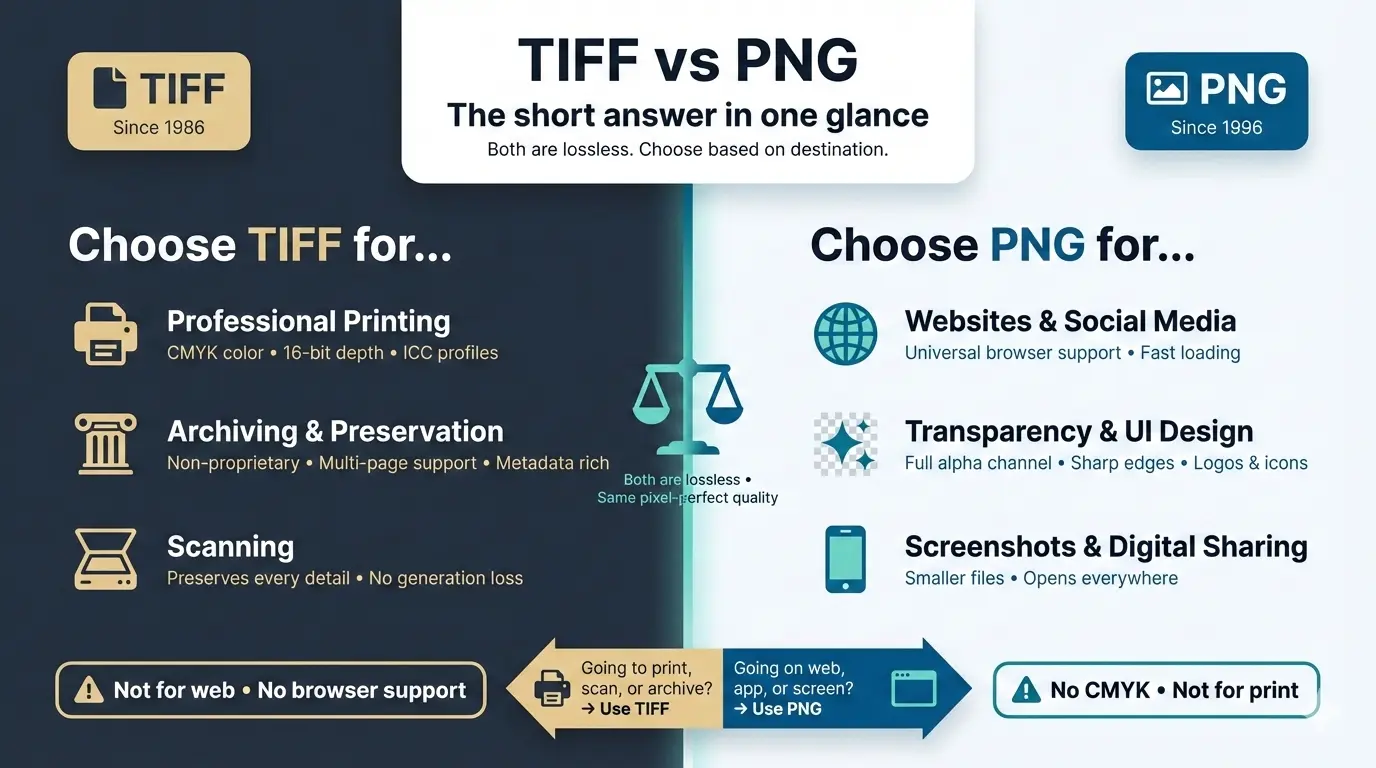
TIFF and PNG can both be lossless, so image quality is identical at the same bit depth. Choose TIFF for professional printing, scanning and archiving. Choose PNG for websites, apps and screenshots. The real differences are file size, color modes such as CMYK, transparency and browser support.
This guide compares TIFF vs PNG on quality, resolution, file size, transparency, color depth and web support, shows how to compare two files yourself, and explains why colors sometimes change when you convert TIFF to PNG.
TIFF vs PNG at a glance
Is TIFF better than PNG?
Neither is better in every case. TIFF is better for professional printing, scanning and archiving. PNG is better for websites, apps and digital design.
- For print: TIFF supports CMYK, 16-bit depth and embedded ICC profiles. Print shops usually ask for TIFF or PDF.
- For the web: PNG displays in every browser, supports transparency and produces much smaller files than uncompressed TIFF.
Is TIFF better quality than PNG?
No, not at the same bit depth. With lossless compression, a TIFF and a PNG contain exactly the same pixels, so they look identical. The only TIFF that loses quality is one saved with JPEG compression.
TIFF pulls ahead in workflow, not in how a finished image looks:
- 32-bit and CMYK: TIFF can store 32-bit files and CMYK, which PNG cannot.
- 16-bit: the PNG format also allows 16 bits per channel, but many apps and browsers reduce it to 8-bit for display or export, while TIFF 16-bit is the standard in photo editing and print workflows. The extra data will not look better on a normal 8-bit screen, but it prevents banding when you push shadows, highlights and gradients.
Quality verdict: for viewing, both are perfect. For editing and CMYK print, TIFF gives you more room.
Does TIFF have a higher resolution than PNG?
No. Resolution is set by the pixel dimensions, not the file format. A 6000 × 4000 pixel TIFF and a 6000 × 4000 pixel PNG have the same resolution.
DPI (or PPI) is only a tag that tells software how large to print the image. Both formats can store it. At 300 PPI, 6000 × 4000 pixels prints at 20 × 13.3 inches. What matters for print is having enough pixels for the size you need.
TIFF vs PNG file size: why is TIFF so big?
The main reason is that TIFF files are often saved uncompressed. You can calculate the uncompressed size yourself: width × height × channels × bytes per channel.
- 10-megapixel photo, RGB, 8-bit: 10,000,000 × 3 bytes = 30 MB
- 24-megapixel photo, RGB, 8-bit: 72 MB. At 16-bit it doubles to 144 MB.
Compression changes the picture:
- LZW is a simple compression that often shrinks photos only a little.
- ZIP in TIFF uses Deflate, the same algorithm PNG uses, so a ZIP-compressed TIFF often ends up close to the size of the equivalent PNG.
- Content matters: screenshots and flat graphics compress enormously, while detailed photos compress far less, in both formats.
Test it on your own image: save the same file as uncompressed TIFF, TIFF with LZW, TIFF with ZIP and PNG, then compare the sizes. Results vary a lot from one image to the next, which is why we do not quote fixed numbers.
For photos on the web, both formats lose to modern lossy formats. See the main drawback of the PNG file format.
Transparency: PNG works everywhere, TIFF varies
PNG supports a full alpha channel, so each pixel can have 256 levels of transparency at 8-bit. Every browser and image viewer displays it correctly, which is why logos, icons and UI elements use PNG.
TIFF also supports alpha channels, but some software ignores them or flattens them onto a solid background. And since most browsers cannot display TIFF, TIFF transparency does not help you online.
Can browsers display TIFF?
Only Safari displays TIFF natively. Chrome, Firefox and Edge will download the file or show nothing. If you want a scan or print master on your site, convert it to PNG (or a lossy format such as JPEG or WebP for photos).
TIFF vs PNG for printing
- CMYK: commercial printing often requires it. PNG only works in RGB.
- 16-bit depth and ICC profiles: TIFF keeps more tonal data and can embed a profile for accurate color.
- What printers ask for: usually TIFF or PDF, and many prefer PDF/X. Always follow your printer's specification.
For a home printer or local photo lab, a PNG with enough pixels for the print size is fine. For magazines, books and fine-art reproduction, use TIFF or whatever the printer specifies. See the dedicated guide on TIFF vs PNG for printing.
TIFF vs PNG for scanning and archiving
TIFF is the standard for archival scans. It stores scanner settings and color profiles, supports 16-bit and multi-page files, and is openly documented and widely readable.
A lossless PNG scan holds the same pixels, so it is acceptable for personal use. TIFF is the safer choice for long-term archives because of its metadata, bit depth and multi-page support. Read TIFF vs PNG for scanning for details.
Archivist tip: scan once to a lossless TIFF master and never overwrite it. Create PNG or JPEG copies for sharing.
What are the disadvantages of TIFF?
- Large files. Uncompressed, a 24-megapixel photo is 72 MB at 8-bit.
- Poor web support. Only Safari displays TIFF.
- Inconsistent transparency. Some software ignores alpha channels.
- Many variants. TIFF can use different compressions and bit depths, and some programs fail to open the less common ones.
More in TIFF advantages and disadvantages.
What are the disadvantages of PNG?
- No CMYK. It cannot be used directly for CMYK print workflows.
- Single image per file. No multi-page documents.
- Less consistent metadata support. EXIF and XMP can be embedded, but software handles them less reliably than in TIFF.
- Bigger than lossy formats. For photos, JPEG, WebP and AVIF are much smaller.
More in PNG advantages and disadvantages.
When to use TIFF
- Sending files to a commercial printer that requests TIFF.
- Scanning documents, photos or film negatives.
- Archiving master files for the long term.
- Editing photos in 16-bit or 32-bit.
- Storing multi-page documents in one file.
When to use PNG
- Publishing images on the web.
- Logos, icons and UI elements that need transparency.
- Screenshots with text.
- Sharing images with people who do not have special software.
How to convert TIFF to PNG without ruining the colors
Converting is common: edit as TIFF, publish as PNG. Know what changes:
- CMYK becomes RGB. PNG cannot store CMYK.
- Bit depth may drop. A 16-bit TIFF becomes 8-bit unless your tool exports 16-bit PNG.
- Multiple pages are split. Each page becomes its own PNG.
- The color profile can be lost. This is the most common cause of colors that look wrong.
Why do colors look different after converting TIFF to PNG?
Usually the color profile. If the TIFF uses a wide-gamut profile (Adobe RGB, ProPhoto) or CMYK, and the PNG is saved without a proper conversion, the same numbers are interpreted in a different color space. Colors can look duller or more saturated depending on the viewer and screen. Fix: convert the image to the sRGB profile (do not just discard or reassign the profile) before exporting to PNG for the web.
With ImageMagick, a plain conversion that forces 8-bit looks like this:
magick input.tif -depth 8 output.png
For an online option, use a free online image converter with no signup.
How to compare a TIFF and a PNG file
To check whether two files hold the same pixels, ImageMagick can count the pixels that differ:
magick compare -metric AE image.tif image.png null:
# prints 0 when every pixel is identical
To see bit depth, color space and file size of each file:
magick identify image.tif image.png
If you converted a 16-bit TIFF to an 8-bit PNG, expect a non-zero difference. That is not a bug: the extra precision was removed.
Common questions about TIFF vs PNG
Is TIFF the same as PNG?
No. Both are raster, lossless-capable formats, but TIFF is built for print and archiving (CMYK, 16/32-bit, multi-page) while PNG is built for the web (transparency, small files, universal support).
Is a TIF file the same as a TIFF file?
Yes. .tif and .tiff are two extensions for the same format, and both use the MIME type
image/tiff.Can PNG have multiple pages like TIFF?
No. A PNG holds one image. APNG can store animation frames, but they are not separate pages.
Is TIFF or PNG better for the web?
PNG. It works in every browser and files are smaller than uncompressed TIFF. Only Safari displays TIFF.
Is a PNG smaller than a TIFF?
Usually smaller than an uncompressed or LZW TIFF. A TIFF saved with ZIP compression can end up close to PNG size.
What is the difference between TIFF, PDF and PNG?
TIFF and PNG are image formats. PDF is a document container that can hold text, vector graphics and images, and it is a common format for print delivery.
Which is better for publication?
For print, follow the publisher's specification, which is often TIFF or PDF. For online publication, use PNG for graphics and screenshots, and JPEG or WebP for photos. Many journals ask for TIFF figures, so check the author guidelines.
Is PNG or TIFF better for textures?
PNG is common for 8-bit textures with transparency. 16-bit files (TIFF or 16-bit PNG) are used when you need extra precision, for example height maps. Check what your engine imports.
The verdict: TIFF vs PNG
Use TIFF for print, scanning, archiving and serious editing. Use PNG for anything that lives on a screen. Quality is not the deciding factor, since both can be lossless. Destination is. Keep a TIFF master, and export PNG copies for the web.
Need to convert a TIFF? Use the free converter at Image Converter 24.
Summary: TIFF and PNG can both be lossless, so quality is identical at the same bit depth. TIFF supports CMYK, 32-bit and multiple pages, and is the standard for print and archiving. PNG has smaller files, full transparency and works in every browser, so it is the standard for the web. Choose by destination.