AVIF vs JPG | Which Image Format Is Better?
AVIF is technically better in almost every way—smaller files, better quality, and modern features like HDR and transparency. But JPG is still the most compatible format, supported everywhere. For new websites, AVIF with a JPG fallback is the ideal solution.
This guide compares AVIF vs JPG across image quality, file size, compression efficiency, and real-world browser support. You will learn why AVIF is the future, when JPG still makes sense, and how to choose the right format for your images.
This guide compares AVIF vs JPG across image quality, file size, compression efficiency, and real-world browser support. You will learn why AVIF is the future, when JPG still makes sense, and how to choose the right format for your images.
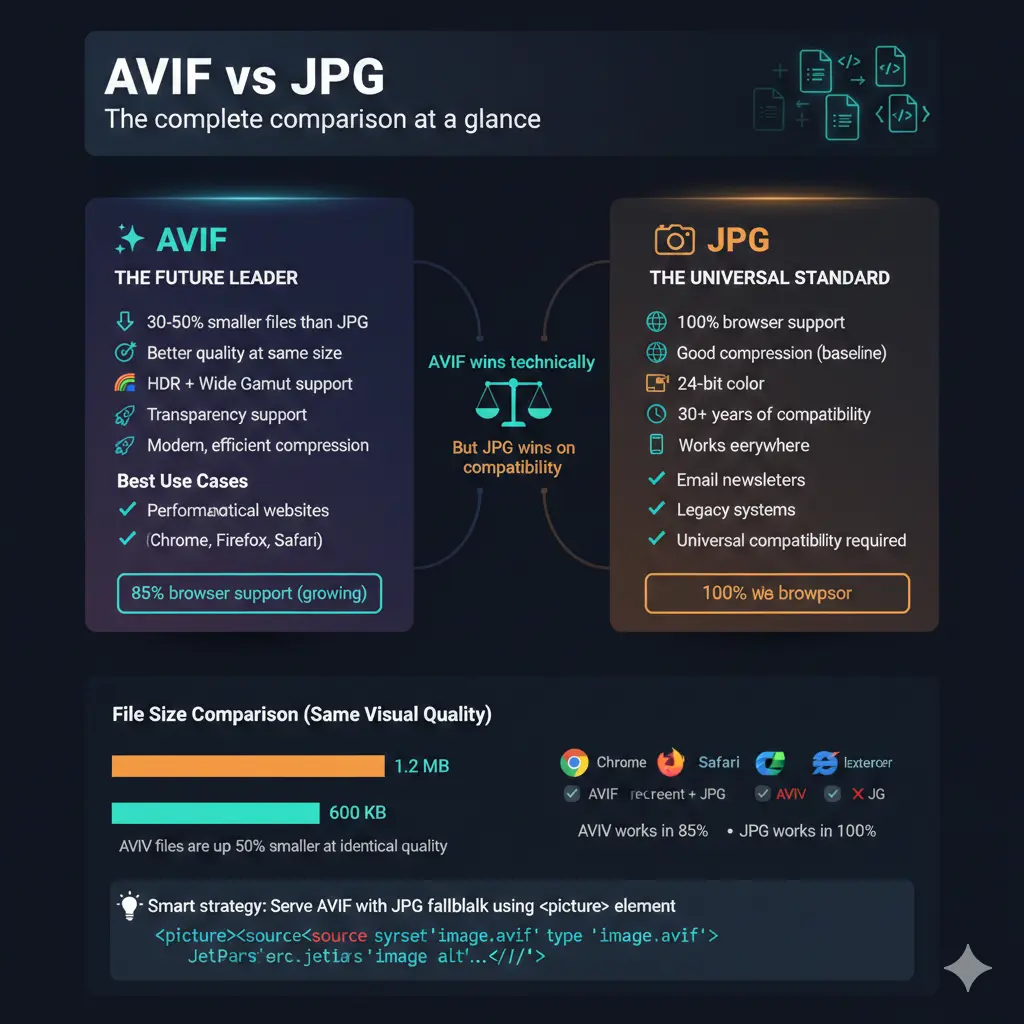
JPG has been the king of image formats for over three decades. It is everywhere—on every website, every camera, every phone. But AVIF is the new challenger, promising significantly smaller files with better quality. So which one should you use?
Let us dive deep into the comparison and find out.
Let us dive deep into the comparison and find out.
What are AVIF and JPG?
JPG (or JPEG): Created in 1992, JPG uses lossy compression to create small file sizes. It is designed for photographs and complex images. It supports 24-bit color but no transparency. JPG is the most widely supported image format in history.
AVIF (AV1 Image File Format): Released in 2019, AVIF is based on the AV1 video codec. It offers both lossy and lossless compression, supports HDR, wide color gamuts, and transparency. AVIF can produce files 50% smaller than JPG at the same quality.
AVIF (AV1 Image File Format): Released in 2019, AVIF is based on the AV1 video codec. It offers both lossy and lossless compression, supports HDR, wide color gamuts, and transparency. AVIF can produce files 50% smaller than JPG at the same quality.
Why AVIF instead of JPG?
There are several compelling reasons to choose AVIF over JPG:
- Smaller file sizes 📌 AVIF typically produces files 30-50% smaller than JPG at the same visual quality. This means faster websites and less bandwidth usage.
- Better quality at same size 📌 At the same file size, AVIF looks significantly better than JPG, with fewer artifacts and better detail preservation.
- Modern features 📌 AVIF supports HDR (High Dynamic Range), wide color gamuts like Rec.2020, and transparency—none of which JPG supports.
- Lossless option 📌 Unlike JPG, AVIF can also save images losslessly, giving you flexibility.
The only reason to stick with JPG is compatibility. JPG works everywhere. AVIF works in modern browsers but not in older ones.
Is AVIF high-quality?
Yes, AVIF offers excellent quality. It uses advanced compression techniques from the AV1 video codec, which allows it to preserve fine details while keeping file sizes remarkably small.
At high quality settings, AVIF is visually indistinguishable from the original. At medium settings, it looks better than JPG at the same file size. At low settings, it degrades more gracefully than JPG, with fewer blocking artifacts.
For photographs, AVIF is a clear quality winner over JPG at equivalent file sizes.
At high quality settings, AVIF is visually indistinguishable from the original. At medium settings, it looks better than JPG at the same file size. At low settings, it degrades more gracefully than JPG, with fewer blocking artifacts.
For photographs, AVIF is a clear quality winner over JPG at equivalent file sizes.
Is AVIF higher quality than PNG?
For lossless quality, both can achieve perfect reproduction. PNG is lossless by nature, and AVIF also offers a lossless mode. However, lossless AVIF files are typically smaller than PNG files.
For lossy compression, AVIF produces much higher quality than PNG at the same file size. But PNG is not designed for lossy compression—it is meant to be lossless.
If you need perfect quality and transparency, PNG is the safe choice. If you want the smallest possible files with excellent quality, AVIF lossy mode is better.
For lossy compression, AVIF produces much higher quality than PNG at the same file size. But PNG is not designed for lossy compression—it is meant to be lossless.
If you need perfect quality and transparency, PNG is the safe choice. If you want the smallest possible files with excellent quality, AVIF lossy mode is better.
Which photo format is best quality?
For photographs, the answer depends on your priorities:
For most practical purposes, AVIF offers the best combination of quality and file size for photographs.
AVIF vs JPG: Head-to-head comparison
File size comparison: Real numbers
Let us look at real file sizes for a typical photograph:
The savings are substantial. Switching from JPG to AVIF can cut your image file sizes in half while maintaining the same visual quality.
Browser support - The practical reality
As of 2025, AVIF support is:
- Chrome: Full support (since version 85)
- Firefox: Full support (since version 93)
- Safari: Supported in recent versions (macOS Monterey+ and iOS 15+)
- Edge: Full support (Chromium-based)
- Internet Explorer: Not supported
Overall, about 80-85% of global users have browsers that support AVIF. This number grows every month as older browsers are replaced.
JPG, by contrast, is supported by literally every browser ever made—100% compatibility.
JPG, by contrast, is supported by literally every browser ever made—100% compatibility.
Transparency and HDR: AVIF's secret weapons
JPG cannot do transparency at all. If you need a transparent background, you must use PNG, WebP, or AVIF. AVIF supports full alpha channel transparency, just like PNG.
More importantly, AVIF supports HDR (High Dynamic Range). HDR images capture more detail in shadows and highlights, and they look stunning on modern HDR displays. AVIF can store HDR metadata and color information that JPG simply cannot handle.
If you are working with HDR photography or next-generation displays, AVIF is the only choice among these two formats.
More importantly, AVIF supports HDR (High Dynamic Range). HDR images capture more detail in shadows and highlights, and they look stunning on modern HDR displays. AVIF can store HDR metadata and color information that JPG simply cannot handle.
If you are working with HDR photography or next-generation displays, AVIF is the only choice among these two formats.
When to choose AVIF
Choose AVIF when:
- You want the smallest possible file sizes for your website
- You care about performance and Core Web Vitals
- You are working with HDR or wide gamut images
- You need transparency in a modern, efficient format
- You can implement fallbacks for older browsers
- Your audience uses modern browsers (Chrome, Firefox, Safari, Edge)
When to choose JPG
Choose JPG when:
- You need maximum compatibility with older browsers and devices
- You cannot implement fallback formats
- You are preparing images for email (many email clients have limited format support)
- You are working with legacy systems or software
- File size savings are less important than guaranteed display
- You need simplicity—JPG just works everywhere
Smart approach: Use both. Serve AVIF to modern browsers, and JPG as a fallback. This gives you the best performance without sacrificing compatibility.
How to serve AVIF with JPG fallback
The HTML
<picture> element makes this easy:<picture> <source srcset="image.avif"
type="image/avif"> <source srcset="image.webp"
type="image/webp"> <img src="image.jpg"
alt="Description"> </picture>
This code serves AVIF to browsers that support it, WebP as a second option, and JPG as the final fallback. Everyone gets the best format their browser can handle.
AVIF vs WebP vs JPG
You might also be considering WebP, another modern format. Here is how they compare:
- JPG: Universal support, good quality, larger files
- WebP: Excellent support (96%+), good compression, transparency support
- AVIF: Best compression, HDR support, slightly lower browser support (80%+)
For a detailed comparison of JPG and WebP, read our guide on JPG vs WebP.
How to convert JPG to AVIF
Converting your existing JPG images to AVIF is straightforward:
- Use a free unlimited image converter online
- Upload your JPG files
- Select AVIF as the output format
- Choose quality settings (higher quality = larger files)
- Download your converted AVIF images
For batch conversion, look for tools that support multiple files at once.
JPG vs AVIF for different use cases
For websites and blogs
AVIF with JPG fallback is ideal. You get the smallest files for fast loading, and everyone sees your images. If you cannot implement fallbacks, WebP is a good alternative with better support.
For email newsletters
Stick with JPG. Email clients have very limited format support. JPG is safe. For more advice, see the best format to scan documents for email.
For photography portfolios
Consider AVIF. If your audience is likely using modern devices, AVIF will deliver the best quality with faster loading. Provide JPG downloads for those who need them.
For social media
JPG is still standard. Most social platforms convert uploads to their preferred formats anyway. JPG works everywhere.
For archiving
Use lossless formats like TIFF or PNG. JPG is lossy and degrades with each save. AVIF lossless is an option, but not yet as widely supported for archiving.
The future of image formats
JPG has had an incredible run—over 30 years as the dominant image format. But the web is changing. Users expect faster sites, better quality, and modern features like HDR. AVIF delivers all of this.
Browser support for AVIF will only increase. As older browsers fade away, AVIF will become the new standard. The transition is already happening.
For now, the smart strategy is to use both. Serve AVIF to modern browsers, and JPG to everyone else. This gives you the best of both worlds.
Browser support for AVIF will only increase. As older browsers fade away, AVIF will become the new standard. The transition is already happening.
For now, the smart strategy is to use both. Serve AVIF to modern browsers, and JPG to everyone else. This gives you the best of both worlds.
The verdict - AVIF vs JPG
AVIF is the technically superior format. It produces smaller files, better quality, and supports modern features like HDR and transparency. For new websites and projects, AVIF should be your first choice.
JPG is the compatibility champion. It works absolutely everywhere with zero configuration. It is not going away, and it remains the safest choice when you cannot control the viewing environment.
The best approach is not to choose one format forever. Use AVIF where it benefits your users and JPG where it is required. With modern tools, this hybrid approach is easy to implement and delivers the best possible experience for everyone.
JPG is the compatibility champion. It works absolutely everywhere with zero configuration. It is not going away, and it remains the safest choice when you cannot control the viewing environment.
The best approach is not to choose one format forever. Use AVIF where it benefits your users and JPG where it is required. With modern tools, this hybrid approach is easy to implement and delivers the best possible experience for everyone.
Final thought: If you are starting a new website today, serve AVIF with JPG fallbacks. Your users will get faster pages, and you will be ready for the future. Convert your images using a reliable online converter to get started.
Summary: AVIF offers better compression, higher quality, and modern features like HDR and transparency. JPG offers universal compatibility and simplicity. For most websites, serve AVIF with JPG fallbacks using the
<picture> element. This gives you the smallest files while ensuring everyone can see your images.