JPG vs JPEG XL | Everything You Need to Know
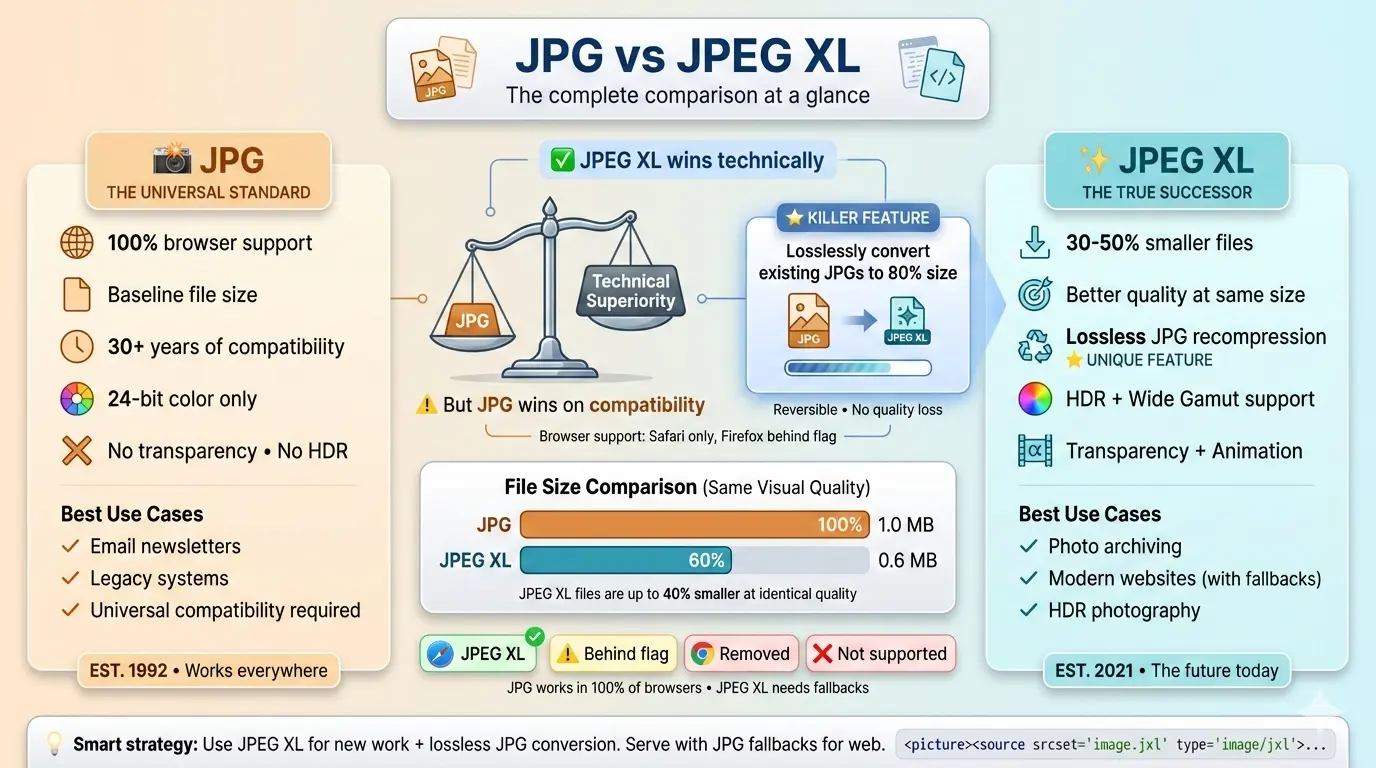
JPEG XL is technically superior in almost every way—smaller files, better quality, modern features, and even lossless recompression of existing JPGs. But JPG is still the most compatible format, supported everywhere. For new work, JPEG XL is the future. For existing libraries, JPEG XL offers a painless upgrade path.
This guide compares JPG vs JPEG XL across image quality, file size, compression efficiency, and real-world use cases. You will learn why JPEG XL is being called the true successor to JPG, when you should switch, and how it compares to other modern formats like AVIF.
This guide compares JPG vs JPEG XL across image quality, file size, compression efficiency, and real-world use cases. You will learn why JPEG XL is being called the true successor to JPG, when you should switch, and how it compares to other modern formats like AVIF.
For over three decades, JPG has been the undisputed king of image formats. It is everywhere—on every website, every camera, every phone. But technology moves forward, and the need for better compression and modern features has led to the creation of JPEG XL, a format designed by the same Joint Photographic Experts Group that brought us the original JPG.
Let us explore everything you need to know about these two formats.
Let us explore everything you need to know about these two formats.
What are JPG and JPEG XL?
JPG (or JPEG): Created in 1992, JPG uses lossy compression to create small file sizes. It is designed for photographs and complex images. It supports 24-bit color but no transparency. JPG is the most widely supported image format in history.
JPEG XL: Finalized in 2021, JPEG XL is the next-generation format from the JPEG committee. It offers both lossy and lossless compression, supports HDR, wide color gamuts, transparency, and animation. It can also losslessly recompress existing JPG files to about 80% of their original size.
JPEG XL: Finalized in 2021, JPEG XL is the next-generation format from the JPEG committee. It offers both lossy and lossless compression, supports HDR, wide color gamuts, transparency, and animation. It can also losslessly recompress existing JPG files to about 80% of their original size.
Should I use JPEG or JPEG XL?
If you are creating new images today and want the best quality at the smallest size, JPEG XL is the better choice. It offers 30-50% better compression than JPG, supports modern features like HDR and transparency, and is designed to be a true successor.
However, JPG is still the safest choice for maximum compatibility. If your images need to work everywhere—including very old browsers, email clients, or legacy systems—JPG is the proven standard.
The ideal strategy: Use JPEG XL for new work, and keep JPG versions for compatibility where needed. For existing JPG libraries, you can losslessly convert them to JPEG XL to save space without losing quality.
However, JPG is still the safest choice for maximum compatibility. If your images need to work everywhere—including very old browsers, email clients, or legacy systems—JPG is the proven standard.
The ideal strategy: Use JPEG XL for new work, and keep JPG versions for compatibility where needed. For existing JPG libraries, you can losslessly convert them to JPEG XL to save space without losing quality.
What is the difference between JPG and JPEG?
This is a common point of confusion. JPG and JPEG are exactly the same format. The only difference is the file extension:
- .jpg – Used on Windows systems that required three-letter extensions
- .jpeg – Used on Mac and Linux systems that allowed four-letter extensions
There is no difference in quality, compression, or features. You can rename a .jpg file to .jpeg and it will open perfectly. Both use the same MIME type:
JPEG XL, by contrast, is a completely new format with its own file extension (.jxl) and MIME type (
image/jpeg. JPEG XL, by contrast, is a completely new format with its own file extension (.jxl) and MIME type (
image/jxl).Is JPEG XL better than AVIF?
This is a debated question among image format enthusiasts. Both formats are excellent, but they have different strengths:
JPEG XL's unique ability to losslessly recompress existing JPG files is a killer feature for archiving. AVIF has better browser support today. Both are technically excellent.
What is the difference between JPEG and JPEG XL in Lightroom?
As of 2025, Adobe Lightroom does not natively support JPEG XL export. Most photographers still work with JPG, TIFF, or DNG for editing and export.
However, you can use external tools to convert your edited images to JPEG XL after exporting from Lightroom. This gives you the benefits of JPEG XL for storage or web use, while keeping your Lightroom workflow unchanged.
As JPEG XL adoption grows, Adobe may add native support in future versions.
However, you can use external tools to convert your edited images to JPEG XL after exporting from Lightroom. This gives you the benefits of JPEG XL for storage or web use, while keeping your Lightroom workflow unchanged.
As JPEG XL adoption grows, Adobe may add native support in future versions.
JPG vs JPEG XL | Head-to-head comparison
The killer feature - Lossless JPEG recompression
One feature sets JPEG XL apart from every other modern format: it can losslessly recompress existing JPG files to about 80% of their original size.
This means you can take your entire library of JPG photos, convert them to JPEG XL, and save significant storage space—without losing a single pixel of quality. Even more impressive, you can reverse the process and get back the exact original JPG file if needed.
For photographers, archivists, and anyone with large JPG collections, this is a game-changer.
This means you can take your entire library of JPG photos, convert them to JPEG XL, and save significant storage space—without losing a single pixel of quality. Even more impressive, you can reverse the process and get back the exact original JPG file if needed.
For photographers, archivists, and anyone with large JPG collections, this is a game-changer.
Browser support | The current situation
As of 2025, JPEG XL browser support is:
- Safari: Full support (macOS and iOS)
- Firefox: Available behind a flag (disabled by default)
- Chrome: Support was added experimentally, then removed in 2023
- Edge: Follows Chrome, so not supported
- Other browsers: Mostly unsupported
This limited support is the main obstacle to JPEG XL adoption. For detailed technical information, read the JPEG XL specification.
JPEG XL vs JPEG XR
JPEG XR was Microsoft's attempt at a next-generation format. It never gained significant traction. JPEG XL is superior in every way: better compression, more features, and an open standard. For a full breakdown, read JPEG XL vs JPEG XR.
When to use JPG
Choose JPG when:
- You need maximum compatibility with all browsers and devices
- You are preparing images for email (email clients have limited format support)
- You cannot implement fallback formats
- You are working with legacy systems or software
- Your audience includes users on very old browsers
When to use JPEG XL
Choose JPEG XL when:
- You want the smallest possible files with the best quality
- You are archiving images and want to save space without losing quality
- You have a large JPG library and want to reduce storage costs
- You need HDR, wide gamut, or transparency support
- You control the viewing environment (apps, internal tools, etc.)
- You are preparing for the future and can provide fallbacks
Smart approach for websites: Serve JPEG XL to browsers that support it, with JPG as a fallback. This gives you the best of both worlds—future-ready performance with universal compatibility.
How to serve JPEG XL with JPG fallback
The HTML
<picture> element makes this easy:<picture> <source srcset="image.jxl"
type="image/jxl"> <source srcset="image.webp"
type="image/webp"> <img src="image.jpg"
alt="Description"> </picture>
This code serves JPEG XL to browsers that support it, WebP as a second option, and JPG as the final fallback. Everyone gets the best format their browser can handle.
How to convert JPG to JPEG XL
Converting your images to JPEG XL is straightforward:
- Use the official libjxl tools or an online converter
- For lossy conversion: Choose quality settings (higher quality = larger files)
- For lossless JPG recompression: Use the lossless transcoding option
- Download your JPEG XL files
For a quick comparison with another modern format, read our guide on JPG vs WebP.
The future of JPEG XL
Will JPEG XL ever gain universal browser support? It is possible, but not guaranteed. Apple supports it in Safari, which is a positive sign. Mozilla has shown interest but has not enabled it by default. Google's removal from Chrome was a major blow.
However, JPEG XL is already finding success in other areas: digital asset management, archiving, professional photography, and applications where browser support is not required. Its lossless JPG recompression feature alone makes it valuable for anyone with large image libraries.
For now, JPEG XL remains a format for early adopters and specialized use cases, but its technical merits are undeniable.
However, JPEG XL is already finding success in other areas: digital asset management, archiving, professional photography, and applications where browser support is not required. Its lossless JPG recompression feature alone makes it valuable for anyone with large image libraries.
For now, JPEG XL remains a format for early adopters and specialized use cases, but its technical merits are undeniable.
The verdict | JPG vs JPEG XL
JPEG XL is technically superior. It compresses better, supports modern features, and offers unique capabilities like lossless JPG recompression. If browser support were universal, it would be the obvious choice for everything.
JPG is the compatibility king. It works absolutely everywhere with zero configuration. It is not going away, and it remains the safest choice when you cannot control the viewing environment.
The smart strategy depends on your needs:
JPG is the compatibility king. It works absolutely everywhere with zero configuration. It is not going away, and it remains the safest choice when you cannot control the viewing environment.
The smart strategy depends on your needs:
Final thought: JPG has had an incredible 30-year run. JPEG XL is the first format that truly deserves to be called its successor. While browser support catches up, you can already benefit from JPEG XL for archiving and in controlled environments. Convert your images using a reliable image converter to get started.
Summary: JPEG XL offers better compression, modern features, and lossless JPG recompression. JPG offers universal compatibility. For archiving, JPEG XL is a game-changer. For web use, serve JPEG XL with JPG fallbacks. For email and legacy systems, stick with JPG.