What Is JPEG 2000 vs JPEG XL Full Comparison
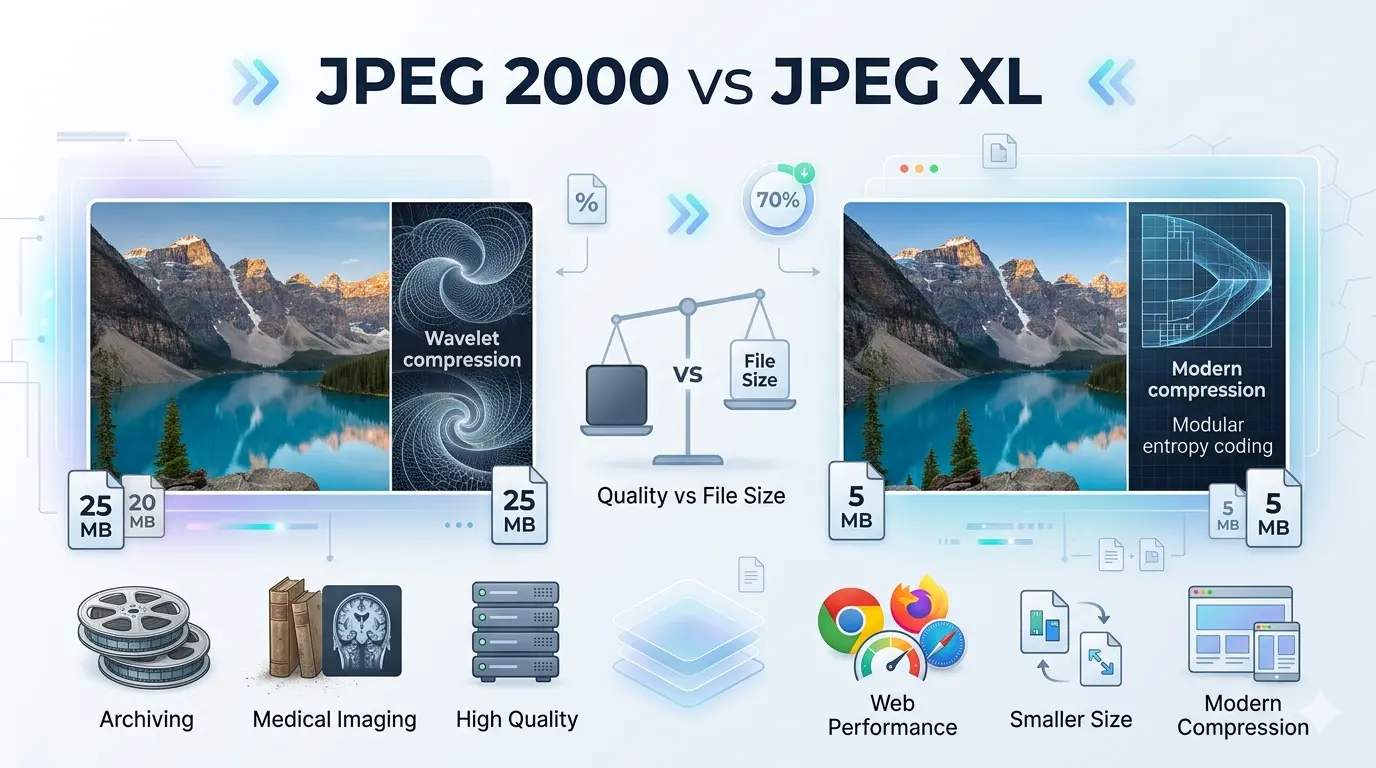
Understanding the nuances of these formats is crucial for web developers, photographers, and digital archivists. In this comprehensive guide, we will dive deep into the technical specifications, real-world applications, and the distinct differences between JPEG 2000 and JPEG XL. We will explore their compression technologies, quality at identical file sizes, web browser support, and the optimal use cases for each. By the end of this article, you will have a clear, actionable understanding of which format suits your specific needs.
What does JPEG 2000 mean?
Instead of relying on the traditional block-based compression that often causes those ugly, blocky artifacts in highly compressed JPEGs, JPEG 2000 uses a cutting-edge mathematical algorithm called the Discrete Wavelet Transform (DWT). This technology allows the image to be compressed as a continuous whole rather than in small 8x8 pixel blocks. The result is an image that, even at extremely high compression rates, looks softer and slightly blurred rather than broken and pixelated.
JPEG 2000 was highly ambitious for its time. It introduced groundbreaking features, such as seamless scalability. This means a single JPEG 2000 file can be decoded at different resolutions and quality levels without needing to download multiple versions of the image. However, because its algorithms were so computationally heavy, standard consumer hardware in the early 2000s struggled to process it quickly, leading to poor initial adoption by mainstream tech companies and web browsers.
If you are working in the medical imaging field (DICOM) or digital cinema distribution (DCP), JPEG 2000 is still the golden standard. Its ability to handle lossless compression of massive files with extremely high color depth makes it indispensable in these industries.
What does JPEG XL mean?
Unlike JPEG 2000, JPEG XL was built from the ground up for the modern internet. It combines the best of all worlds: it uses a modernized version of the traditional Variable block size Discrete Cosine Transform (VarDCT) alongside advanced modular encoding. This dual approach allows it to handle both photographic content and computer-generated graphics (like text, line art, and flat UI elements) with breathtaking efficiency.
One of the most mind-blowing features of JPEG XL is its ability to re-compress existing legacy JPEG files into the JPEG XL format losslessly, reducing their file size by about 20% to 30% without altering a single pixel. If needed, you can easily restore the exact original legacy JPEG from the JXL file. This makes it an absolute dream for server administrators sitting on petabytes of old JPEG images.
Do not confuse JPEG XL with other formats like HEIC, WebP, or AVIF. While those formats are also modern, JPEG XL is specifically designed to be the direct, most backward-compatible evolutionary step from the standard JPEG format.
What is JPEG XL vs JPEG 2000?
1. Compression Technology
- JPEG 2000 Uses Discrete Wavelet Transform (DWT). This compresses the image globally, avoiding blocky artifacts entirely. However, the math involved is highly complex and CPU-intensive.
- JPEG XL Uses a hybrid approach of VarDCT and Modular encoding. It dynamically chooses block sizes (ranging from 2x2 up to 256x256 pixels) based on image complexity, maximizing efficiency while keeping processing lightweight.
2. Quality at the Same File Size
- JPEG 2000 Provides a significant quality bump over legacy JPEGs at identical file sizes. At high compression, images tend to look blurry or "smudged" rather than pixelated.
- JPEG XL Offers dramatically superior visual quality compared to JPEG 2000 at the exact same file size. It preserves fine textures, film grain, and sharp text far better than the wavelet approach of JP2.
3. Lossless and Lossy Support
4. HDR and Color Depth
5. Decompression Speed and Performance
- JPEG 2000 Is notoriously slow to decode. Even on modern hardware, rendering large JP2 files takes noticeably longer than other formats, which heavily hurt its web adoption.
- JPEG XL Was designed specifically to be decoded blazingly fast on modern multi-core processors. It decodes much faster than AVIF and is heavily optimized for fast web delivery.
Why is JPEG XL not supported?
However, the format is far from dead. Apple took the opposite route and officially added native support for JPEG XL across its entire ecosystem in iOS 17 and macOS Sonoma. Safari now fully supports JPEG XL, allowing iPhone and Mac users to experience its benefits. As Apple pushes the format, there is growing hope that Google will eventually be forced to reinstate support in Chrome.
If you are a web developer, you can start using JPEG XL today by using the HTML `
Jpeg ls vs jpeg2000
JPEG-LS is a highly specialized standard developed in the late 1990s. The "LS" stands for Lossless. Unlike JPEG 2000, which is built to handle both massive lossy compression and lossless compression, JPEG-LS is designed purely and strictly for high-speed, mathematically lossless compression. It uses a predictive coding technique (known as LOCO-I) rather than wavelets or DCT.
Because JPEG-LS requires very little computational power, it is extremely fast. However, it lacks the scalability, lossy compression abilities, and robust error resilience of JPEG 2000. Today, JPEG-LS is mostly confined to very specific niche applications, primarily in space exploration (like Mars Rover transmissions) and certain medical hardware, while JPEG 2000 remains much more versatile.
What is the difference between JPEG 2000 and JPEG XR?
The main difference is the underlying math. While JPEG 2000 uses the complex Wavelet Transform, JPEG XR relies on a more traditional, but highly optimized, block-based transform similar to the original JPEG. This made JPEG XR much lighter on the CPU and faster to decode than JPEG 2000. JPEG XR also heavily pushed for HDR support and transparency (alpha channels).
Despite its advantages, JPEG XR suffered from the same fate as JPEG 2000: poor adoption. Outside of the Internet Explorer and Windows ecosystem, it never gained mainstream web traction. Today, both specialized formats have essentially been eclipsed by modern alternatives like WebP, AVIF, and JPEG XL.
Is JPEG 2000 higher quality than JPEG?
When you compress a standard JPEG heavily, the image breaks down into ugly, distinct 8x8 squares—a phenomenon known as macroblocking or artifacting. Because JPEG 2000 uses wavelets to analyze the entire image continuously, heavy compression results in a soft, blurred effect instead of blocky artifacts. While blurriness isn't ideal, it is generally much more pleasing to the human eye than pixelated blocks. Furthermore, JPEG 2000 supports higher bit depths (more colors) and true lossless compression, things the standard JPEG struggles with.
Is JPEG 2000 still used?
Here are the primary areas where JPEG 2000 dominates:
- Digital Cinema When a movie is distributed to theaters, it is delivered as a Digital Cinema Package (DCP). Every single frame of that 4K cinema movie is encoded as a lossless JPEG 2000 image. Its ability to handle massive color depth makes it the undisputed king of Hollywood.
- Medical Imaging The healthcare industry relies on the DICOM standard for X-rays, MRIs, and CT scans. JPEG 2000 is a preferred format here because it allows lossless compression of massive medical files, ensuring doctors don't miss tiny details masked by compression artifacts.
- Archival Storage Libraries, museums, and historical archives use JPEG 2000 to scan and preserve delicate historical documents because of its lossless nature and high dynamic range capabilities.
Do not use JPEG 2000 for standard web design or everyday photography. Because it is not universally supported by web browsers (Chrome and Edge ignore it) and takes longer to decode, it will ruin your website's performance and user experience.
How to convert JPEG 2000 to JPEG?
To seamlessly convert your files, you need a reliable online tool. We highly recommend using a dedicated, high-quality conversion service. You can use the best free image converter to handle this task instantly without downloading heavy software.
Here are the steps to convert your image:
- Upload your file 📌 Go to the online image converter tool and drag-and-drop your `.jp2` or `.j2k` file into the upload box.
- Select output format 📌 Choose standard JPEG (or JPG) from the dropdown list. You can also select PNG if you want to retain lossless quality.
- Adjust quality 📌 Set the output quality slider. A setting of 80-90% usually offers the best balance between file size and visual fidelity.
- Convert and Download 📌 Click the convert button. Within seconds, your new, universally compatible JPEG file will be ready to download.
Is JPEG 2000 good for printing?
When preparing files for large-scale print, maintaining a high bit depth is critical to prevent color banding (where smooth gradients look like staggered steps). JPEG 2000 supports deep color profiles and lossless compression, ensuring that the printer receives every single piece of data originally captured by the camera or scanner. However, most commercial print shops still prefer TIFF or PDF formats simply due to industry habit and software compatibility. If you plan to send a JPEG 2000 file to a printer, always confirm with them beforehand that their Raster Image Processor (RIP) software supports `.jp2`.
Which JPEG quality is the best?
If we rank them based on technological superiority and quality retention at low file sizes:
- JPEG XL (Best): Unmatched in modern efficiency, HDR support, text rendering, and high-fidelity texture preservation.
- JPEG 2000: Excellent quality, smooth gradients, but suffers from blurring at low bitrates and slow decoding speeds.
- JPEG XR: Good quality, supports transparency and HDR, but largely obsolete.
- Legacy JPEG (Standard): The lowest visual quality among the family, prone to blocky artifacts and limited color depth, but still the reigning champion of universal compatibility.
Is JPEG 2000 better than PNG?
For Photographs: JPEG 2000 is far superior. PNG uses a compression algorithm called DEFLATE, which is terrible at compressing complex photographic images. A lossless JPEG 2000 photograph will have a significantly smaller file size than the exact same photograph saved as a PNG.
For Web Graphics: PNG is the better choice for everyday use. PNG supports transparency (alpha channels) perfectly, is deeply integrated into every single web browser, and compresses computer-generated graphics (logos, text, flat illustrations) beautifully. While JPEG 2000 also supports transparency, its lack of web browser support makes it useless for web designers.
In summary: Use JPEG 2000 for archiving heavy, high-resolution photographs. Use PNG for logos, transparent web assets, and screenshots.
Does the iPhone support JPEG 2000?
Since iOS version 4, Apple has supported JPEG 2000 through the Safari web browser and its core image APIs. This means you can view `.jp2` files natively in your iPhone's browser or photo viewing applications without needing third-party software.
Interestingly, Apple is also the current champion of JPEG XL. With the release of iOS 17 and macOS Sonoma, Apple fully integrated JPEG XL support across its ecosystem. This forward-thinking approach means Apple devices are uniquely positioned to handle both the legacy powerhouse (JPEG 2000) and the next-generation champion (JPEG XL) flawlessly.
On the other hand, JPEG XL is a technological marvel built precisely for the modern web. Its ability to flawlessly re-compress decades of legacy JPEGs without losing a single pixel of quality, combined with lightning-fast decoding and native HDR support, makes it the logical successor to the standard JPEG.
While browser politics currently hinder JPEG XL's complete takeover, the continued support from major players like Apple suggests a bright future. Whether you are preserving medical histories with JPEG 2000 or preparing your website's future architecture with JPEG XL, understanding these formats ensures your images will look beautiful, load fast, and stand the test of time.
Simplify the Way You Work with Images
Image files are a core part of modern digital work. Whether you're publishing content, building websites, preparing documents, or sharing visuals online, managing formats efficiently can save both time and effort. The challenge is that image requirements often change from one platform to another, making flexibility an essential part of any workflow.
Instead of relying on multiple tools for different tasks, having one reliable solution can make the entire process smoother. Image Converter 24 provides a simple way to convert, optimize, and prepare image files directly in your browser. The interface is clean, the process is quick, and the results are dependable enough for both personal and professional use.
A streamlined workflow is not just about saving clicks — it’s about reducing interruptions. When your image tools are fast and easy to access, you spend less time solving technical issues and more time focusing on the creative or strategic side of your work.
Whether your goal is better performance, easier sharing, or faster content production, using a browser-based solution keeps the process efficient and accessible from anywhere.
Visit Image Converter 24