JPEG Advantages and Disadvantages | The Complete Guide
You have probably saved thousands of JPEGs without thinking twice. It is the default format on almost every camera, phone, and website. But why? What makes JPEG so popular, and where does it fall short?
This guide gives you an honest, complete overview of the advantages of JPEG. You will learn why this format dominates the web, how it balances quality and file size, and exactly when you should use it—or avoid it. By the end, you will understand JPEG well enough to make confident choices for your own images.
This guide gives you an honest, complete overview of the advantages of JPEG. You will learn why this format dominates the web, how it balances quality and file size, and exactly when you should use it—or avoid it. By the end, you will understand JPEG well enough to make confident choices for your own images.
JPEG (Joint Photographic Experts Group) debuted in 1992. It was designed to solve one problem: make photographic images small enough to store and share. It succeeded so well that it became the most widely used image format in history.
But JPEG is not magic. It uses lossy compression, which means it discards image data to save space. Understanding this trade‑off is the key to using JPEG effectively.
But JPEG is not magic. It uses lossy compression, which means it discards image data to save space. Understanding this trade‑off is the key to using JPEG effectively.
What are the advantages and disadvantages of JPEG?
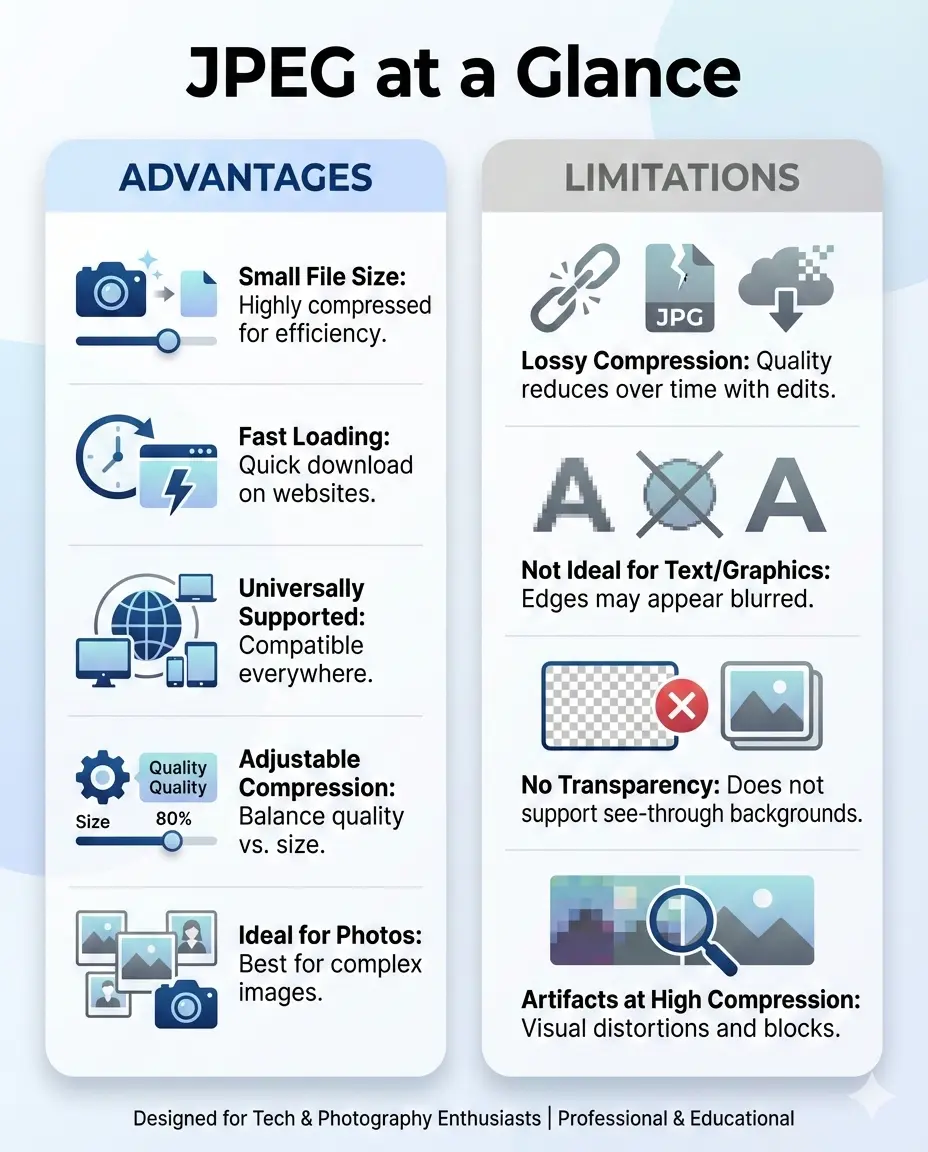
Advantages: JPEG creates small file sizes, especially for photographs. It is supported by every device, browser, and software application ever made. You can control the balance between quality and size by adjusting compression settings.
Disadvantages: JPEG uses lossy compression, so every save degrades quality slightly. It does not support transparency. It struggles with sharp edges and text, introducing visible artifacts. It also lacks support for layers or multiple pages.
For a deeper look at both sides, read this detailed breakdown of JPEG advantages and disadvantages.
Disadvantages: JPEG uses lossy compression, so every save degrades quality slightly. It does not support transparency. It struggles with sharp edges and text, introducing visible artifacts. It also lacks support for layers or multiple pages.
For a deeper look at both sides, read this detailed breakdown of JPEG advantages and disadvantages.
What are the advantages of JPEG over RAW?
JPEG has three clear advantages over RAW:
- File size 📌 A RAW file can be 5–10 times larger than a JPEG. A 24‑megapixel RAW image might be 30 MB; the same photo as JPEG Fine could be 4–5 MB. This makes JPEG much easier to store and share.
- Immediate usability 📌 JPEG opens everywhere. Phones, tablets, email, websites, social media—all accept JPEG instantly. RAW requires special software to view and edit.
- Processing speed 📌 Cameras write JPEGs faster than RAW because the camera processes and compresses the image internally. This matters for burst shooting and sports photography.
RAW gives you far more editing flexibility. But if you need to share photos quickly or save space, JPEG is the practical choice.
What are JPEG images good for?
JPEG excels in three main areas:
- Photographs — JPEG was literally designed for continuous‑tone images like photos. It handles complex colors and gradients efficiently, producing small files with excellent visual quality.
- Web and social media — JPEG is the universal language of online images. Every platform accepts it, every browser displays it, and the small file size means fast loading.
- Email and sharing — When you need to send images that anyone can open without special software, JPEG is the safest bet.
Quick tip: Use JPEG for photos and web images. Use PNG for graphics with text or transparency. Use RAW for professional editing where you need maximum flexibility.
JPEG advantages: The complete list
Let us look at each advantage in detail:
- Small file size 📌 JPEG's lossy compression can reduce file size by 90% compared to uncompressed formats. At medium quality settings, the difference is often invisible to the naked eye.
- Universal compatibility 📌 JPEG is supported by literally every digital device, operating system, and web browser. It is the closest thing to a universal image language.
- Adjustable quality 📌 You control the trade‑off. Save at 100% quality for near‑lossless results (large files) or at 60% for web use (tiny files with minor artifacts).
- Fast encoding and decoding 📌 JPEG compression is relatively simple. Cameras and phones save JPEGs instantly, and browsers render them quickly.
- Wide color support 📌 JPEG handles 24‑bit color (16.7 million colors) and can embed ICC color profiles for consistent display.
- Progressive rendering 📌 Progressive JPEGs load in waves, showing a blurry preview then sharpening. This improves perceived performance on slow connections.
JPEG disadvantages: What it cannot do
JPEG is not perfect. Here are its real limitations:
- Lossy by nature — Every time you save a JPEG, you lose some data. Repeated edits and saves cause generational quality loss.
- No transparency — JPEG does not support alpha channels. You cannot have a transparent background.
- Artifacts on sharp edges — Text, logos, and high‑contrast lines develop blurring or "ringing" artifacts.
- No layers — JPEG is a flat format. You cannot edit individual elements later.
- No 16‑bit support — For professional editing, JPEG's 8‑bit depth limits flexibility in shadows and highlights.
JPEG vs PNG: When to choose each
JPEG vs WebP: The modern challenger
WebP offers similar quality to JPEG but with 25–35% smaller files. It also supports transparency and animation. So why use JPEG at all?
JPEG's advantage over WebP is compatibility. WebP works in all modern browsers, but not in older ones. JPEG works everywhere, forever. For maximum reach, JPEG is still the safest choice.
For a detailed comparison, see is WebP better quality than JPEG. Many websites now serve WebP to modern browsers with a JPEG fallback, giving users the best of both worlds.
JPEG's advantage over WebP is compatibility. WebP works in all modern browsers, but not in older ones. JPEG works everywhere, forever. For maximum reach, JPEG is still the safest choice.
For a detailed comparison, see is WebP better quality than JPEG. Many websites now serve WebP to modern browsers with a JPEG fallback, giving users the best of both worlds.
Why JPEG dominates the web
JPEG's success comes down to three factors:
- Size: Photographs compressed with JPEG load quickly even on slow connections.
- Quality: At reasonable compression levels, the loss is invisible to most viewers.
- Ubiquity: No format decision required. JPEG just works.
When you upload a photo to Instagram, Facebook, or Twitter, the platform converts it to JPEG anyway. When you send a picture via email, JPEG is the format that opens without asking questions. This universal acceptance is JPEG's superpower.
When JPEG is the best option
Choose JPEG when:
- You are sharing photographs — Especially online or via email.
- You need small file sizes — For websites, social media, or storage‑constrained devices.
- You want universal compatibility — When you cannot control what software your recipients use.
- You are printing everyday photos — Photo labs accept JPEG as standard.
- You are done editing — JPEG is a delivery format, not a working format.
When JPEG is the wrong choice
Avoid JPEG when:
- You need transparency — Use PNG or WebP.
- You are editing images repeatedly — Each save degrades quality. Work in TIFF, PSD, or another lossless format.
- You have text or sharp lines — Logos, screenshots, and diagrams look better in PNG.
- You need maximum editing flexibility — RAW or TIFF preserve more data for adjustments.
- You are archiving master copies — Lossless formats ensure future generations retain full quality.
Important note for photographers: Shoot RAW + JPEG. Keep the RAW files as your digital negatives. Use JPEG for sharing, social media, and client previews. This gives you both quality and convenience.
How to get the best quality from JPEG
Even though JPEG is lossy, you can maximize quality with these tips:
- Start with a high‑quality source 📌 Edit in a lossless format first. Export to JPEG only as the final step.
- Use the highest quality setting that makes sense 📌 For important images, save at 90–100%. For web use, 80–85% is usually indistinguishable from the original.
- Save only once 📌 Every additional save causes more loss. If you must edit a JPEG, work on a copy and save back to JPEG only at the end.
- Consider progressive JPEG 📌 For web use, progressive JPEGs load more gracefully on slow connections.
If you need to convert images between formats while maintaining quality, use a best free image converter online no signup tool for quick, reliable results.
JPEG 2000, JPEG XL, and the future
Newer JPEG variants exist. JPEG 2000 offered better compression but never gained wide adoption. JPEG XL is a modern successor that promises significantly smaller files with better quality. It supports lossless compression and transparency.
However, adoption is slow. JPEG itself remains the king because it is good enough and everywhere. For now, understanding classic JPEG is essential for anyone working with images.
However, adoption is slow. JPEG itself remains the king because it is good enough and everywhere. For now, understanding classic JPEG is essential for anyone working with images.
Summary: JPEG advantages and disadvantages
JPEG advantages:
- Very small file sizes, especially for photographs
- Universal compatibility across all devices and platforms
- Adjustable quality to balance size and appearance
- Fast encoding and decoding
- Progressive rendering option for web use
- Lossy compression means quality loss on every save
- No transparency support
- Artifacts on text and sharp edges
- 8‑bit only, limited editing headroom
- Not suitable for graphics or line art
The bottom line: JPEG is the world's most popular image format for good reason. It balances quality and file size brilliantly for photographs. Use it for photos, web images, and everyday sharing. But know its limits—use PNG for graphics and transparency, and work in RAW or TIFF when you need maximum editing flexibility. JPEG is a tool, not a universal solution. Use it where it belongs, and your images will look great without wasting space.