JPEG2000 or TIFF for Video? The Ultimate Guide (2026)
If you work with digital cinema, film restoration, or high-end video archiving, you have almost certainly run into a moment where someone asks whether your image sequences should be saved as JPEG2000 or TIFF. It sounds like a small technical detail, but the choice affects file size, playback compatibility, color accuracy, and how much storage you will need five years from now. This guide walks through exactly how the two formats behave when used for video, where each one wins, and how to move between them without losing quality.
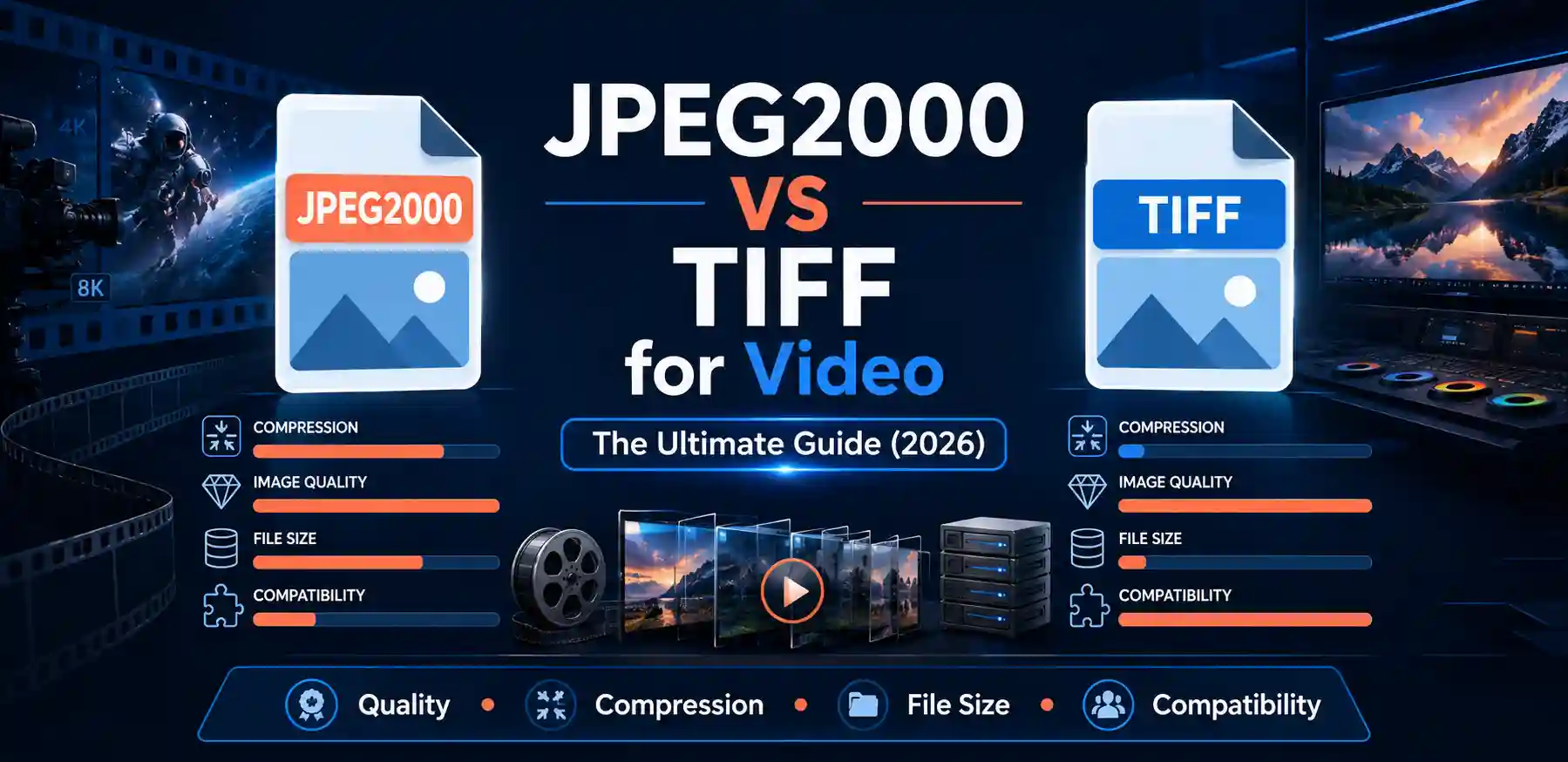
For video and image-sequence work, JPEG2000 is generally the better choice when you need efficient, high-quality compression at large frame sizes (it's the standard behind Digital Cinema Packages), while TIFF is the better choice when you need a simple, universally supported, often uncompressed master format for archiving or heavy VFX work. If you need to convert between the two quickly, a browser-based image converter that handles both formats without installing specialized software is usually the fastest way to get there.
This guide covers how JPEG2000 and TIFF actually differ when used for video and image sequences, when each format makes sense for your workflow, how to convert files between them, and answers to the most common questions people search for on this topic.
What JPEG2000 and TIFF Actually Are (And Why Video People Use Both)
Neither JPEG2000 nor TIFF is a video format in the way MP4 or ProRes is. Both are still-image formats. In professional video and film work, though, footage is frequently stored not as a single video file but as an image sequence — one still image per frame, numbered sequentially (frame_00001.tif, frame_00002.tif, and so on). This approach is standard in digital intermediate (DI) pipelines, VFX, and archival restoration because it is far more resilient to corruption than a single monolithic video file: if one frame is damaged, you lose one frame, not the whole reel.
JPEG2000 (file extension .jp2 or .j2k) is a compression standard built around wavelet transforms rather than the older discrete cosine transform used by classic JPEG. It supports both lossy and mathematically lossless compression, high bit depths, and very large frame sizes without the blocky artifacts associated with older codecs. This is precisely why the JPEG2000 vs JPEG comparison matters so much for cinema use — JPEG2000 was designed from the ground up to handle the demands that standard JPEG simply cannot meet.
TIFF (Tagged Image File Format) takes a different philosophy. It is a flexible container format that can hold pixel data completely uncompressed, or compressed with lossless algorithms like LZW or ZIP. TIFF does not have a single "look" — a TIFF file can be a small 8-bit LZW-compressed frame or a massive 16-bit uncompressed master. Its strength is universal support: virtually every piece of professional imaging, editing, and color grading software on the planet can read and write TIFF without a plugin.
Neither format is "for video" in the codec sense — they are both frame-based image formats that video pipelines rely on for storing individual frames of a sequence, not for playback.
JPEG2000 vs TIFF for Video: Core Technical Differences
The differences that matter most for a video or film workflow come down to five things: compression efficiency, compression type (lossy vs lossless), color and bit-depth handling, industry adoption, and file size at scale.
| Factor | JPEG2000 | TIFF |
|---|---|---|
| Compression method | Wavelet-based, lossy or mathematically lossless | Uncompressed, or lossless LZW/ZIP |
| Typical file size (4K frame) | Small to moderate | Large to very large |
| Industry standard use | Digital Cinema Package (DCP) mastering | VFX, archiving, digital intermediate |
| Software support | Good, but requires specific codec support | Nearly universal |
| Bit depth support | Up to 16-bit, excellent HDR handling | Up to 32-bit float in extended variants |
In practice, this table plays out like this: a facility doing color grading and heavy compositing will often keep their working masters in TIFF (or a related uncompressed format) because every tool in the pipeline reads it instantly and there is zero risk of compression artifacts creeping into a grade. But once that same project needs to be delivered as a theatrical release, it gets converted to JPEG2000 because that is what the Digital Cinema Package standard requires.
Why JPEG2000 Dominates Digital Cinema Packages (DCP)
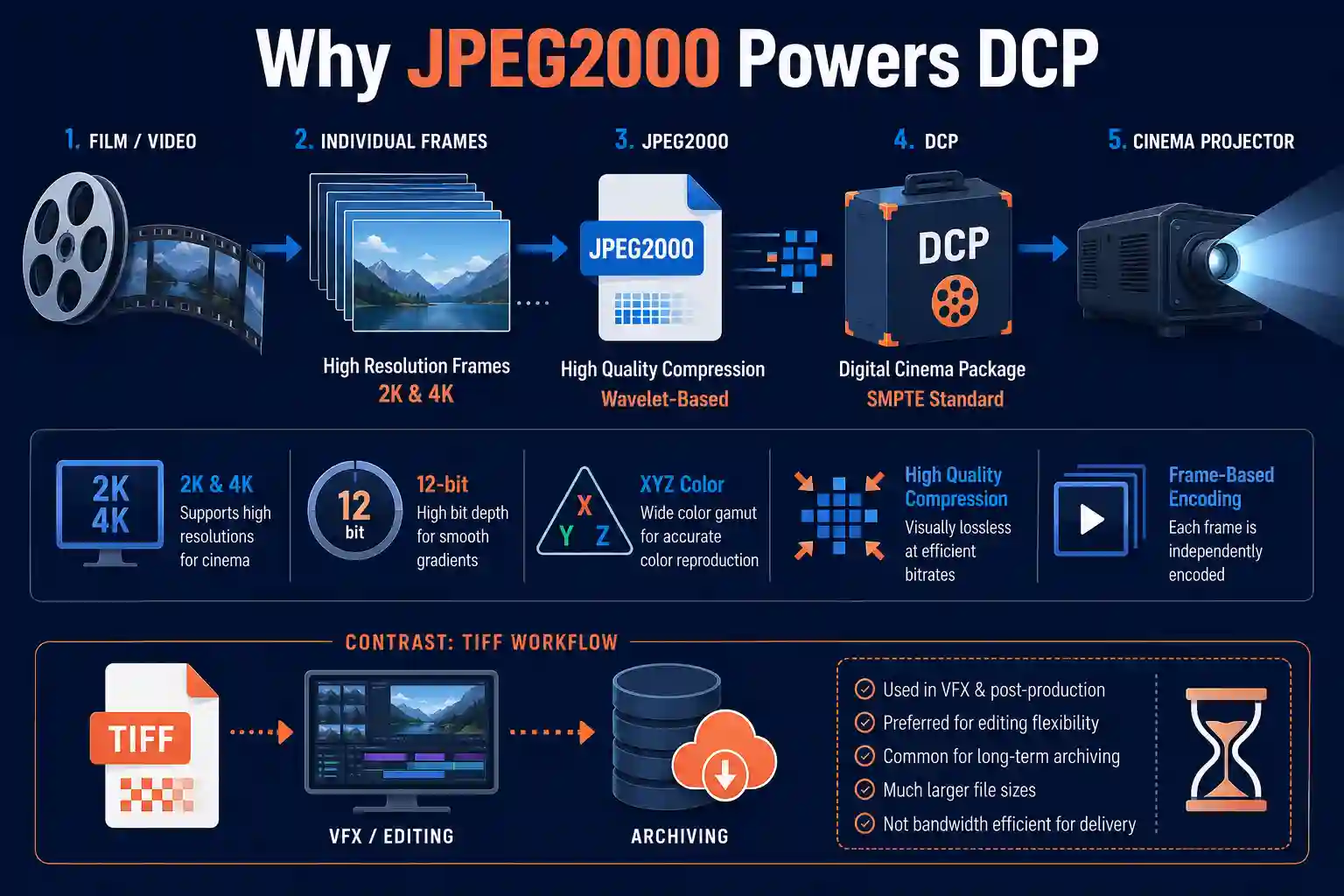
If you have ever wondered why movie theaters don't just play an MP4 or a ProRes file, the answer is the DCP specification, and JPEG2000 sits at its core. The Digital Cinema Initiatives consortium chose JPEG2000 for a few concrete reasons that are worth understanding rather than just accepting as an industry quirk.
- Resolution independence: Wavelet compression scales cleanly to 2K and 4K cinema resolutions without the blocking artifacts that discrete cosine transform codecs can show at high compression ratios.
- Mathematically lossless option: JPEG2000 can be configured for visually lossless or fully lossless compression, which matters when a studio is delivering a master that will be re-graded or re-mastered later.
- Frame-independent encoding: Each frame in a JPEG2000 image sequence is a self-contained file, which fits the same frame-based resilience philosophy used throughout post-production.
- Wide color gamut and high bit depth: JPEG2000 comfortably handles the 12-bit XYZ color space that DCPs require, along with HDR grading data.
This is also why, when facilities compare jpeg2000 vs tiff for printing for large-format cinema posters or archival stills tied to a release, JPEG2000 tends to win on file size while TIFF wins on universal print-shop compatibility. The same trade-off shows up across nearly every professional use case for these two formats.
Important: JPEG2000 support is not automatic in consumer software. Standard web browsers, most photo viewers, and many editing tools need a plugin or a specific build to open .jp2 or .j2k files. Always confirm your delivery pipeline actually supports the format before committing an entire project to it.
Why TIFF Still Wins for Archiving and VFX Work
TIFF's advantage is not efficiency, it is predictability. When you are archiving footage that might need to be opened in twenty years, or when you are compositing hundreds of layers in a VFX pipeline, the last thing you want is a format that requires a specific decoder version to interpret correctly. TIFF's structure is simple enough that virtually any imaging library, from open-source tools to commercial finishing suites, can read it reliably.
For archival masters specifically, an uncompressed or losslessly-compressed TIFF sequence removes any question about generational quality loss. Every time you open, edit, and re-save a lossy file, there is a theoretical risk of accumulated degradation. With TIFF stored uncompressed or with lossless LZW, that risk simply does not exist. This is part of why film restoration houses and national archives frequently standardize on TIFF for long-term preservation, a topic covered in more depth in our breakdown of TIFF Advantages and Disadvantages.
The trade-off is size. An uncompressed 16-bit 4K TIFF frame can run well over 100MB, meaning a two-hour feature at 24 frames per second could require multiple petabytes of storage for the full uncompressed sequence. This is where many pipelines land on a hybrid approach: TIFF for the working masters that are actively being edited, and JPEG2000 (or another efficient lossless codec) for long-term cold storage or final delivery.
Lossless Compression: How the Two Formats Really Compare
A common misconception is that "lossless" always means identical results between formats. It does not — it means no data is discarded during compression, but the underlying encoding method still differs.
TIFF's lossless options (LZW and ZIP/Deflate) are dictionary-based compression algorithms, the same family used in general file compression like ZIP archives. They are effective on images with large flat areas or repeating patterns, but on complex, high-detail film grain or noise-heavy footage, they often achieve only modest size reduction, sometimes 10-30% smaller than uncompressed.
JPEG2000's lossless mode uses a reversible wavelet transform, which tends to perform meaningfully better on photographic and film-like content, frequently achieving 2:1 to 3:1 compression with zero data loss. This is a major reason facilities that need lossless masters but cannot afford the storage cost of raw TIFF increasingly lean toward lossless JPEG2000 instead.
The practical implication: if storage cost is a real constraint and you need a lossless master, JPEG2000 will usually get you there in a smaller footprint than TIFF. If maximum compatibility and simplicity matter more than storage efficiency, TIFF remains the safer default.
Converting Between JPEG2000 and TIFF Without Losing Quality
Most facilities eventually need to move footage between these two formats — pulling a TIFF sequence out of a VFX pipeline and packaging it as JPEG2000 for delivery, or converting an incoming JPEG2000 DCP asset back to TIFF so it can be graded frame by frame. Doing this correctly means using a converter that respects bit depth and color space rather than silently downsampling to 8-bit sRGB, which is a common failure point with generic image tools.
The most direct way to handle a one-off conversion, or even a batch of frames, without installing specialized DI software is a dedicated free unlimited image converter online that supports both formats natively in the browser.
Here is what that conversion process typically looks like when you use a browser-based tool built for this:
- Open the free unlimited image converter online and locate the upload area, usually a large drag-and-drop zone in the center of the page with a secondary "browse files" button for manual selection.
- Drag your TIFF frame (or a batch of frames, depending on the tool's batch support) into the upload zone. A thumbnail preview typically appears within a second or two once the file is read, along with the detected resolution and file size.
- Select JPEG2000 as the output format from the format dropdown. Look for any available quality or compression-mode setting — some converters expose a lossless toggle specifically for this kind of professional conversion, which you should enable if the source is a final master rather than a proxy.
- Start the conversion. For a single 4K frame this generally completes in a few seconds; for a full batch, processing time scales roughly linearly with frame count and file size.
- Download the converted .jp2 file, or the full batch as a zip archive if you converted a sequence. It's worth spot-checking a handful of frames against the source at 100% zoom before trusting the whole batch, particularly around fine detail like film grain or text.
What makes this kind of tool well suited to this specific conversion, rather than a generic photo converter, is that image-sequence work depends on consistent, predictable output across hundreds or thousands of frames — you need the same settings applied identically every time, not a tool that quietly adjusts compression frame by frame.
Honest limitation: browser-based converters are excellent for single frames, spot conversions, and moderate batches, but they are not a replacement for a dedicated DI pipeline when you're processing tens of thousands of frames for a full feature. For genuinely large-scale sequence conversion, a desktop or command-line tool with true batch automation will be faster and give you more granular control over compression parameters. Use the online converter for spot checks, smaller projects, and quick format conversions rather than an entire feature-length master.
Common issue: if a converted JPEG2000 file looks correct in the tool's preview but appears with shifted or dull colors when opened in your editing software, the likely cause is a color profile mismatch rather than a flaw in the conversion itself. Confirm which color space your source TIFF was tagged with (sRGB, Adobe RGB, or a cinema-specific space like DCI-P3), and make sure your editing or grading software is interpreting the JPEG2000 output with that same profile rather than defaulting to sRGB.
jpeg2000 vs tiff for photoshop
Photoshop has supported TIFF natively since its earliest versions, and it remains the format most editors reach for when moving files in and out of Photoshop for frame-by-frame touch-up work, which is common in restoration projects. TIFF preserves layers, alpha channels, and 16-bit or 32-bit color depth without any compatibility concerns.
JPEG2000 support in Photoshop has been inconsistent across versions and often requires the format to be enabled through Photoshop's plugin or preferences settings, or in some builds, a separate plugin entirely. If your workflow depends on opening JPEG2000 frames directly in Photoshop for retouching, it's worth verifying support in your specific Photoshop version before committing, since Adobe has changed JPEG2000 support more than once over the years. For a deeper comparison focused specifically on editing workflows, see our guide on jpeg2000 vs tiff for photoshop.
A common pattern for frame-based restoration work is to convert JPEG2000 DCP frames to TIFF specifically for the Photoshop editing pass, then convert back to JPEG2000 for final delivery, keeping each format in the role it's actually built for.
jpeg2000 vs tiff for printing
Printing is a slightly different use case than video, but it comes up constantly for teams producing promotional stills, posters, or archival prints from film frames. TIFF remains the default expectation at most professional print shops because it's uncompressed or losslessly compressed and universally readable by prepress software.
JPEG2000 is capable of print-quality output too, and its efficient lossless mode can be genuinely useful when transmitting large print-ready files to a remote print vendor. But not every print shop's RIP (raster image processor) software supports JPEG2000 natively, so it's worth confirming compatibility before sending a JPEG2000 file for a large-format print run rather than assuming it will be accepted. Our dedicated comparison on jpeg2000 vs tiff for printing covers resolution and DPI considerations in more detail.
jpeg2000 vs tiff for web
Neither format is a good fit for general web delivery, and this matters if you're publishing behind-the-scenes stills or promotional frames from a video project online. TIFF files are far too large for web use, often tens of megabytes per image, which will hurt page load times and, in turn, search rankings. JPEG2000 has better compression, but browser support remains limited outside of specific ecosystems (notably Safari has had partial support historically, while Chrome and Firefox generally do not support it natively).
For any frame you intend to publish on a website, the practical move is to convert it to a web-native format like JPEG or WebP rather than using either TIFF or JPEG2000 directly. Our full breakdown on jpeg2000 vs tiff for web walks through exactly which web formats to use and why.
jpeg2000 vs tiff for photos
Outside of video and cinema pipelines, photographers occasionally choose between JPEG2000 and TIFF for still-photo archiving. TIFF remains the more common choice among photographers because of its universal support across every major photo editor and its lossless flexibility, including support for layered files in some implementations.
JPEG2000 offers a genuine advantage for photographers who need lossless or near-lossless quality but want smaller files than uncompressed TIFF, particularly for large photo archives where storage cost adds up quickly across thousands of high-resolution images. The trade-off, as with video work, is software compatibility — many photo management and printing workflows still expect TIFF or JPEG by default. Our detailed comparison at jpeg2000 vs tiff for photos goes further into which scenario suits each format for still photography specifically.
Frequently Asked Questions
What is the main difference between JPEG2000 and TIFF for video storage?
JPEG2000 uses wavelet-based compression that can be lossy or mathematically lossless, producing smaller files while retaining excellent quality, and it's the standard for Digital Cinema Packages. TIFF typically stores frames uncompressed or with simple lossless compression like LZW, producing much larger files but with near-universal software support across editing and VFX tools.
Is JPEG2000 a lossless format like TIFF?
JPEG2000 can be configured for either lossy or fully lossless compression, so yes, it can match TIFF's lossless quality. The difference is that JPEG2000's lossless mode typically produces a smaller file than a lossless TIFF because of its more efficient wavelet-based compression algorithm.
Which format is better for long-term film archiving: JPEG2000 or TIFF?
Both are used in professional archiving, but they serve slightly different roles. TIFF is often preferred for archival masters because of its simplicity and guaranteed long-term readability. Lossless JPEG2000 is increasingly used for archiving too, particularly when storage cost is a major factor, since it achieves smaller file sizes without sacrificing quality.
Why is JPEG2000 used in Digital Cinema Packages (DCP)?
The Digital Cinema Initiatives specification adopted JPEG2000 because of its efficient compression at 2K and 4K resolutions, its support for wide color gamuts and high bit depths required for cinema projection, and its ability to encode each frame independently for resilience.
Are TIFF files larger than JPEG2000 files at the same quality level?
Generally, yes. An uncompressed TIFF frame at 4K resolution can be well over 100MB, while a lossless JPEG2000 version of the same frame is typically two to three times smaller due to its more efficient compression algorithm.
Which format is better supported by editing and VFX software?
TIFF has broader, more consistent support across editing, compositing, and VFX software, since it requires no special decoder and has been a standard for decades. JPEG2000 support varies more by application and sometimes requires enabling a specific plugin or codec.
What is the best format for 4K and 8K video projects?
There's no single answer for the entire pipeline. Many facilities use TIFF or another uncompressed format for active editing and grading at 4K/8K, then convert to JPEG2000 for delivery, especially when the delivery format is a Digital Cinema Package that requires JPEG2000 by specification.
Conclusion
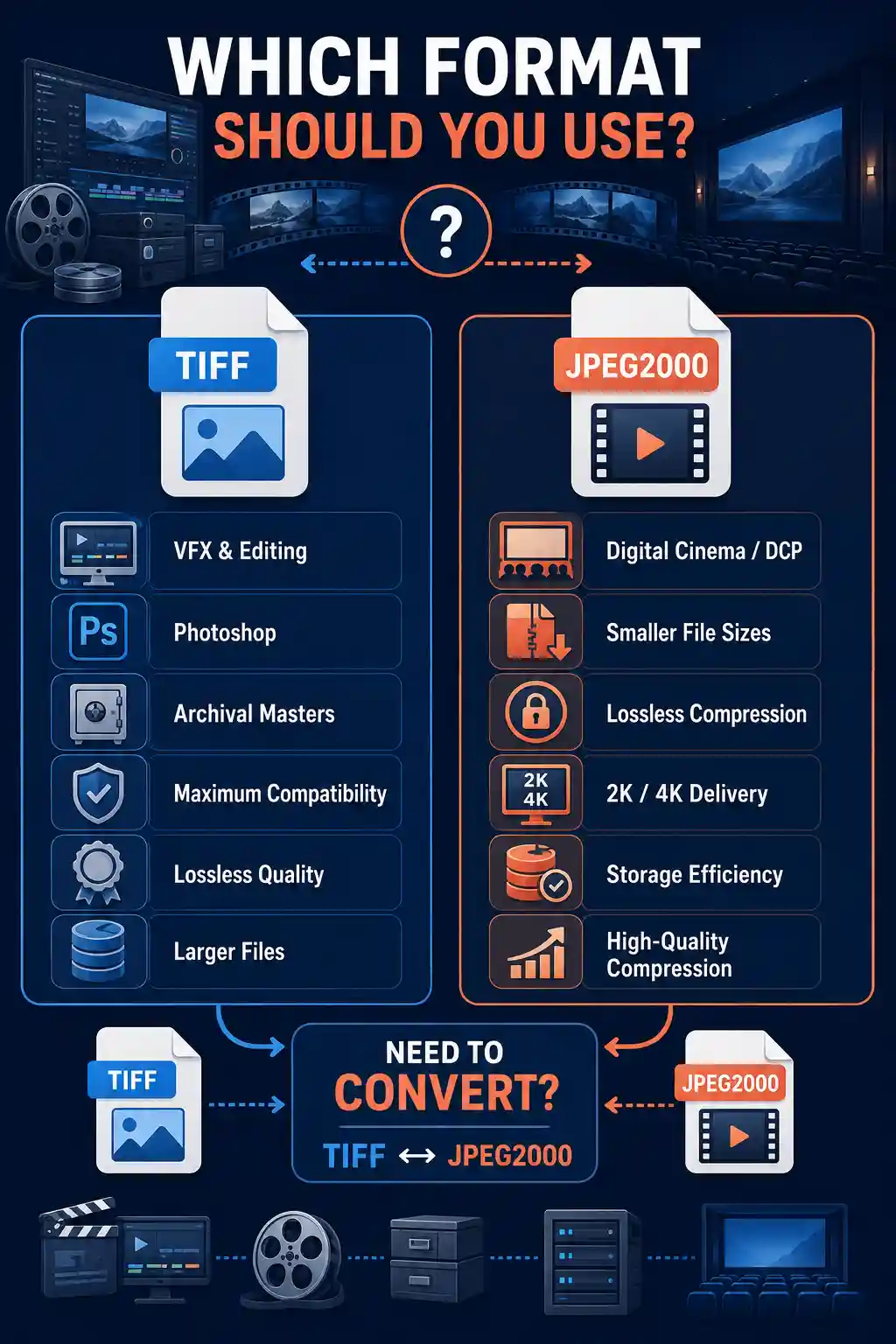
JPEG2000 and TIFF solve different problems within the same video and film pipeline rather than competing head-to-head for a single "best" title. TIFF earns its place through simplicity, universal compatibility, and predictable lossless quality, making it the natural choice for active editing, VFX work, and archival masters. JPEG2000 earns its place through efficient, high-quality compression, which is exactly why it became the backbone of the Digital Cinema Package standard and why it increasingly shows up in storage-conscious archiving workflows.
The right choice for your project usually isn't one format or the other permanently, it's knowing which stage of the pipeline you're in. If you frequently move footage between the two, converting frames back and forth without a full DI suite installed, a browser-based tool can save real time. The free unlimited image converter online handles both formats directly in the browser: upload your frame or batch, choose your target format, and download the result, typically within seconds for a single frame. It won't replace a dedicated DI pipeline for a full feature-length conversion, but for spot conversions, proxies, and smaller projects, it's the fastest path from one format to the other.