APNG vs GIF: Which Animated Image Format Should You Use?
Choosing between APNG vs GIF comes down to three trade-offs: color depth, transparency quality, and where the animation will be displayed. APNG stores 24-bit color with 8-bit alpha transparency, while GIF is limited to a 256-color palette and on/off transparency. The right pick changes depending on whether you care more about image quality or about working in every app.
This guide compares the two formats with exact figures, explains how browser and app support differs, shows how to convert a GIF to APNG step by step, and covers file size, Discord support, and the most common troubleshooting questions.
What Actually Differs Between APNG and GIF

APNG and GIF differ mainly in color depth, transparency, and compression method. APNG extends the PNG format, so each frame can hold up to 16.7 million colors plus 256 levels of transparency, while each GIF frame is restricted to a palette of at most 256 colors with a single transparent index.
| Feature | APNG | GIF |
|---|---|---|
| Colors per frame | Up to 24-bit RGB (16.7 million) | Maximum 256 palette entries |
| Transparency | 8-bit alpha (256 opacity levels) | 1-bit (fully transparent or fully opaque) |
| Compression | Lossless (Deflate, same as PNG) | Lossless (LZW) after reducing to 256 colors |
| Maximum dimensions | 2,147,483,647 × 2,147,483,647 px | 65,535 × 65,535 px |
| MIME type | image/apng (.apng or .png) | image/gif (.gif) |
| Frame delay unit | A fraction (numerator / denominator of a second) | Hundredths of a second |
| Browser support | Chrome 59, Edge 12, Firefox 3, Opera 46, Safari 8 and later | Every current browser |
The dimension and browser figures for APNG come from the MDN image file type and format guide. The same guide describes APNG as a good choice for lossless animation sequences and rates GIF as the less performant option.
Because APNG is built on PNG, a single file also carries a normal still image. The W3C PNG specification (Third Edition) states that software unable to play animation, such as a printer, shows the static image instead of the animation. That fallback is the reason an APNG never breaks completely in old software. It just stops moving.
Browser and App Support: Where Each Format Works
Every current major browser plays APNG, but GIF still has the widest support across apps, email clients, and older software. MDN lists Chrome, Edge, Firefox, Opera, and Safari as supporting APNG, with the earliest versions being Chrome 59, Edge 12, Firefox 3, Opera 46, and Safari 8.
Support gets patchier outside the browser. Image editors, chat apps, and content management systems each decide on their own whether to decode the animation chunks. When an app ignores them, an APNG shows as a still picture, while a GIF in the same app usually keeps moving. Test your file in the exact place it will be published before you convert a whole library.
A second edge case is the file extension. APNG files may use either .apng or .png, and the two cannot be told apart by name alone. Both start with the same eight-byte PNG signature, and a file counts as animated only when it contains an animation control chunk (acTL) ahead of the first image data chunk. If an uploader rejects a .apng file, renaming it to .png can sometimes get it through, though some validators check the contents as well.
How to Choose Between APNG and GIF
Pick APNG when image quality matters and the destination supports it, and pick GIF when universal playback matters more than quality. These rules cover most real situations:
- Logos, UI animations, and stickers with soft edges: APNG. Its 8-bit alpha avoids the jagged halo that GIF’s 1-bit transparency leaves around curved shapes.
- Gradients, shadows, and glow effects: APNG. Reducing these to 256 colors forces GIF to dither or band them.
- Email, older forums, and unknown platforms: GIF. It plays almost everywhere without a fallback.
- Long or photographic clips: neither. Both formats store every frame as a full image, so a short MP4 or WebM video is usually far smaller.
Tip: Quality loss only happens when an animation is reduced to 256 colors. Converting an existing GIF to APNG will not bring lost colors back, so keep the original source file whenever you have it.
If you also want to weigh animated WebP against both formats, the comparison in APNG vs GIF vs WebP covers that three-way decision.
How to Convert a GIF to APNG with Image Converter 24
Once you know APNG is the right target format, the most direct way to get there is a converter that handles the switch in your browser. Image Converter 24 uses a general tool link, so you choose the output format yourself. The steps are:
- Open Image Converter 24 in your browser.
- Upload the GIF you want to convert.
- Choose APNG as the output format. This step exists because the page is not tied to one format pair, so the converter needs to know your target.
- Click Convert.
- Click Download to save the finished APNG.
This workflow fits the APNG vs GIF decision well because you can compare both files side by side in a browser tab and keep whichever looks and weighs better. Nothing needs to be installed, and your original GIF stays untouched.
Technical detail worth knowing: a GIF stores transparency as a single on/off value, so a hard-edged GIF becomes a hard-edged APNG. The conversion changes the container and the color storage, but it cannot invent the soft alpha edges the original never contained. For smooth edges, re-export the animation from its source design file.
Troubleshooting: if the downloaded APNG looks frozen, the app you opened it in probably cannot decode animated PNG and is showing the static image instead. Drag the file into a current Chrome, Firefox, or Safari tab to confirm the animation is intact. If it plays there, the problem is the app and not the file. Looking for other converters to compare? See this list of the Best Free Image Converter Online options.
APNG vs GIF size
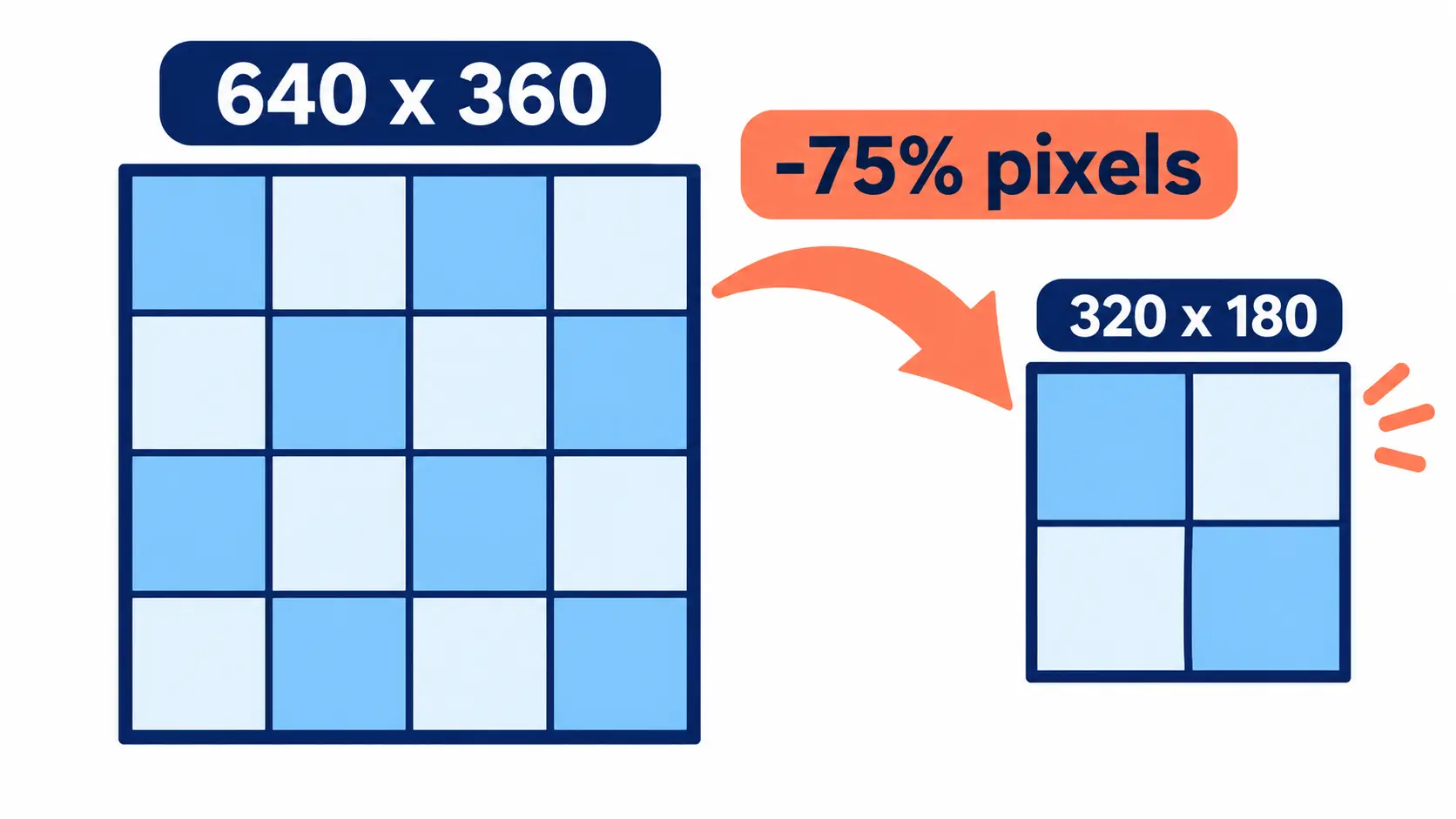
The file size of an APNG compared with a GIF depends on the animation, not on the format name. Flat-color graphics with large unchanged areas can be small in either format, while photographic or gradient-heavy clips are often larger as APNG because each pixel is stored in 24-bit color instead of an 8-bit palette index.
Both formats are lossless at the frame level, so neither one gets smaller by lowering a quality slider. Size is controlled by the content you feed in. The table below shows which levers change the size most, with the arithmetic behind each one.
| Lever | Change | Effect on raw pixel data |
|---|---|---|
| Dimensions | Halve width and height (for example 640×360 to 320×180) | 75% fewer pixels per frame |
| Frame rate | 30 fps to 15 fps | 50% fewer frames |
| Color storage | 24-bit truecolor to 8-bit indexed palette | 1 byte per pixel instead of 3, before compression |
| Duration | Cut a 4-second loop to 2 seconds | 50% fewer frames |
Resizing is the strongest lever because pixel count falls with the square of the scale. If your animation is wider than the place it will be shown, shrink it first with a resize image tool before you compare formats. Combine that with a lower frame rate and you can often cut an animation to a fraction of its starting size without changing the format at all.
Does Discord support APNG
Yes, Discord supports APNG for animated custom stickers. According to the Discord Help Center, animated stickers use APNG and static stickers use PNG, with a maximum file size of 512KB and exact dimensions of 320px by 320px. The same page notes that custom stickers become available once a server is boosted.
The exact 320×320 requirement matters in practice. Many animations are wider than they are tall, and a stretched sticker looks distorted. Fix the proportions first, either by cropping or by padding the canvas to a square. An aspect ratio converter helps with that step, and then you resize to 320×320.
Animated GIFs do not follow the sticker rules above, since the sticker animation format listed by Discord is APNG. Discord’s rules for emoji, avatars, and other uploads are separate and change from time to time, so check the current help page for the upload type you need before preparing files.
Frequently Asked Questions
What’s better, APNG or GIF?
APNG is better for quality, and GIF is better for compatibility. APNG supports 24-bit color and 8-bit alpha transparency, which gives smooth gradients and soft edges. GIF is limited to 256 colors per frame but plays in nearly every app, browser, and email client, so it remains the safe default when you cannot control where the file is opened.
What is the ideal size for a GIF?
There is no single official ideal size, because the best dimensions depend on the platform. As a practical rule of thumb for web and chat use, a width of about 480 to 640 pixels and a file under a couple of megabytes loads quickly. Platform limits override this, such as the 512KB cap for Discord stickers. Technically, a GIF can be as large as 65,535 pixels on each side.
How to reduce APNG size?
Reduce an APNG by lowering its pixel dimensions, lowering the frame rate, shortening the loop, and reducing the color palette. Halving the width and height removes 75% of the pixels in every frame, which is usually the biggest single saving. Dropping from 30 fps to 15 fps removes half the frames. If the animation is flat-colored, converting from truecolor to an 8-bit indexed palette can also help.
What do Gen Z use instead of GIFs?
There is no official statistic, but in practice people lean on short looping video clips, stickers, and reaction images. Many in-app GIF pickers also deliver looping MP4 or WebM video behind the scenes while still calling it a GIF, because video compresses motion much more efficiently than the GIF format does.
Is GIF obsolete?
GIF is technically outdated but not obsolete. The format dates to 1987, and animation arrived with the GIF89a revision in 1989, so its 256-color limit and 1-bit transparency reflect old hardware. It stays in use because every browser, messenger, and email client can display it, and that reach is hard for newer formats to match.
How to turn a GIF into an APNG?
Upload the GIF to an online converter, choose APNG as the output format, convert it, and download the result. With Image Converter 24 that means opening the tool, uploading the file, selecting APNG, clicking Convert, and clicking Download. If you have a whole folder of animations to switch, the Bulk Converter saves you from repeating the process one file at a time.
Why is GIF file size so big?
GIF files are large because the format stores animation as a stack of full indexed-color frames, without the motion prediction that video codecs use. A 3-second clip at 30 fps contains 90 separate frames. Dithering, which GIF uses to fake extra colors, also adds noise that compresses poorly, so photographic content makes the problem worse.
Is JPEG, PNG, or GIF better?
Each one wins a different job. JPEG is best for photographs because its lossy compression produces small files, but it has no transparency and no animation. PNG is best for sharp graphics, screenshots, and images that need transparency. GIF is the only one of the three with basic animation built in. For a deeper breakdown, read Different File Formats for Images: Which Is Best?
Can GIFs be 1080p?
Yes, a GIF can be 1920×1080, because the format allows up to 65,535 pixels per side. The problem is size. One 1080p frame holds 2,073,600 pixels, so a 90-frame clip contains roughly 187 million pixel values before compression. Even after compression the file is usually far too heavy for chat or web use, and a video format is a better fit at that resolution.
Are APNG and PNG the same?
No, but APNG is an extension of PNG and can even share the .png extension. Both begin with the same eight-byte signature. APNG adds animation chunks, which the PNG specification defines as acTL, fcTL, and fdAT, and software that does not understand them shows the plain static image instead.
Is there a better alternative to GIF?
Yes, several formats beat GIF on quality or size. APNG keeps full color and smooth transparency, while animated WebP and AVIF are rated by MDN as better performing but less broadly supported. Short MP4 or WebM clips are smaller still for photographic motion. See APNG vs WebP for how the two closest competitors compare.
Can a GIF be saved as a JPEG?
Yes, but you only get a single still image. JPEG has no animation support, so the result is one frame of the GIF, and because JPEG has no transparency channel, transparent areas are filled with a solid background color. To keep the motion, convert to a format that supports animation, such as APNG.
Why does my APNG show as a still image?
An APNG shows as a still image when the app displaying it cannot decode animation chunks. In that case it falls back to the static image stored inside the file, which is the behavior the PNG specification describes. Open the same file in a current browser to check that the animation itself is fine.
Conclusion
APNG gives you full 24-bit color and 8-bit transparency, GIF gives you reach everywhere, and the better pick depends on where the animation will be shown. In the APNG vs GIF decision, choose APNG for smooth edges, gradients, and platforms such as Discord stickers, and keep GIF for places where compatibility matters most.
Size depends on the content, not on a fixed rule. Shrink the dimensions, lower the frame rate, and shorten the loop to bring any animated file down, and compare both formats before replacing an original.
The fastest way to try APNG is with Image Converter 24. Open the tool, upload your GIF, choose APNG as the output format, click Convert, and click Download. Then open the result next to the original and keep whichever one looks and weighs better.