What Is JPEG XL Format? A Comprehensive Guide
JPEG XL is a next-generation image format designed to replace the original JPEG. It offers significantly better compression, supports modern features like HDR and transparency, and can even losslessly recompress existing JPG files to save space without losing quality.
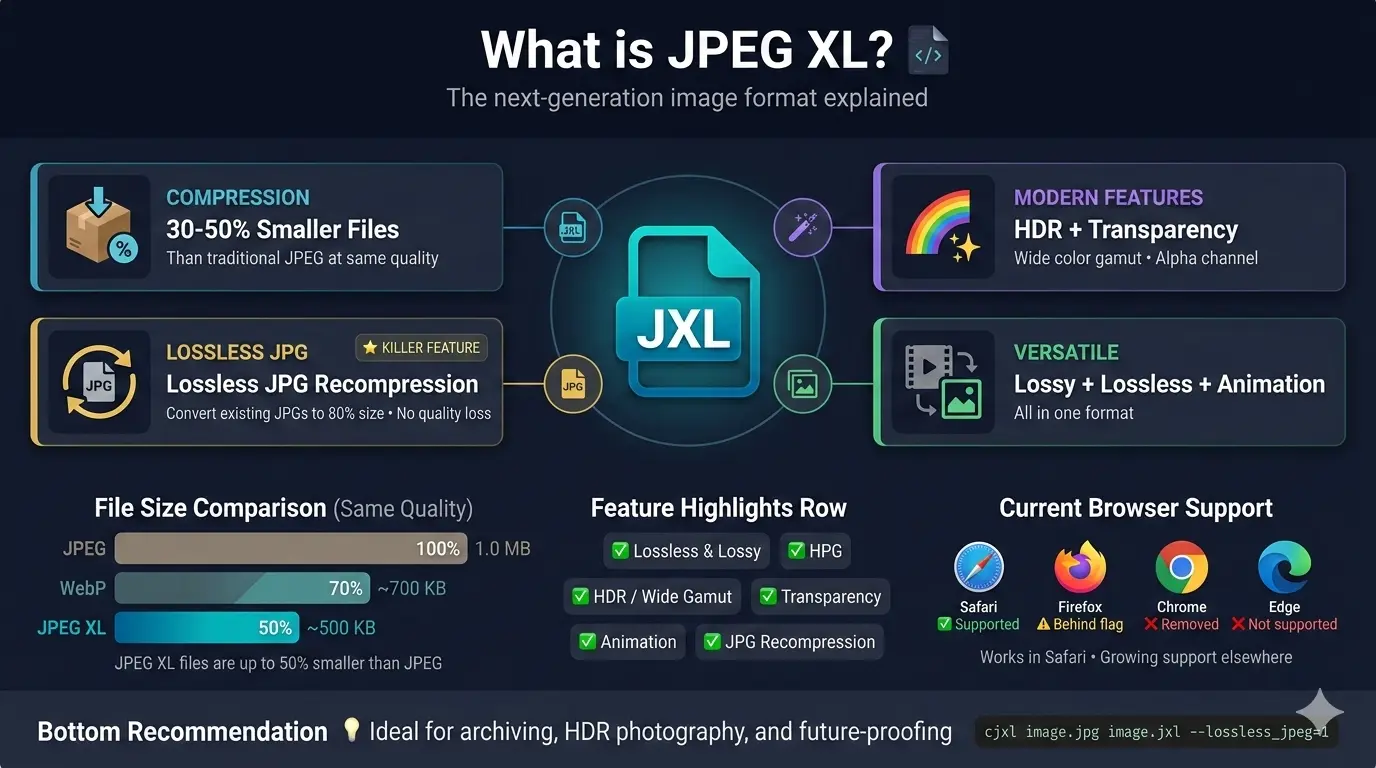
This guide explains everything you need to know about what is JPEG XL format, why it was developed, how it compares to other formats, and whether it might be the right choice for your images.
For over three decades, JPEG has been the world's most popular image format. It is everywhere—on every website, every camera, every phone. But technology moves forward, and the need for better compression and modern features led to the creation of JPEG XL, a format designed by the same Joint Photographic Experts Group that brought us the original JPEG.
Let us explore everything you need to know about this exciting new format.
Let us explore everything you need to know about this exciting new format.
What is JPEG XL?
JPEG XL (short for JPEG X Long-term) is a next-generation image format finalized in 2021. It was developed by the JPEG committee as a true successor to the original JPEG format from 1992.
Key features of JPEG XL:
Key features of JPEG XL:
- Superior compression 📌 JPEG XL produces files 30-50% smaller than traditional JPEG at the same quality.
- Lossless and lossy modes 📌 It supports both lossy compression for web use and lossless compression for perfect quality.
- HDR and wide color gamut 📌 Supports High Dynamic Range and color spaces like Rec.2020 and P3.
- Transparency 📌 Full alpha channel support, just like PNG.
- Animation 📌 Can store animated images, replacing GIF and animated WebP.
- Lossless JPEG recompression 📌 Can convert existing JPG files to JPEG XL and reduce file size by about 20% without any quality loss.
- Progressive decoding 📌 Images load in waves, showing a low-quality preview then sharpening, just like progressive JPEG.
For detailed technical information, read the JPEG XL specification.
Why was JPEG XL developed?
The original JPEG format was created in 1992. While it has served us well, it has several limitations that modern users face:
- Limited compression efficiency by today's standards
- No support for transparency
- No support for HDR or wide color gamut
- Lossy only (no lossless option)
- Artifacts at lower quality settings
JPEG XL was designed to address all these limitations while maintaining backward compatibility with the billions of existing JPEG files. The goal was to create a format that could eventually replace JPEG everywhere.
Is JPEG XL better than PNG?
Yes, in most ways JPEG XL is better than PNG:
For most uses, JPEG XL offers the same or better quality than PNG with smaller files. The only advantage PNG retains is universal browser support.
Is JPEG XL better than WebP?
JPEG XL and WebP are both excellent modern formats. Here is how they compare:
- Compression: JPEG XL typically achieves 20-30% better compression than WebP at the same quality.
- Features: Both support transparency and animation. JPEG XL adds HDR and wider color gamut support.
- Encoding speed: JPEG XL is faster to encode than WebP in many cases.
- Lossless JPEG recompression: JPEG XL can losslessly recompress existing JPGs. WebP cannot.
- Browser support: WebP has excellent support (96%+). JPEG XL support is limited.
For a detailed comparison, read our guide on JPEG XL vs WebP.
How to convert JPG to JPEG XL?
Converting your existing JPG images to JPEG XL is straightforward:
- Use the official libjxl tools 📌 Download the reference encoder from the JPEG XL GitHub repository. Command-line tools like
cjxlanddjxlgive you full control. - Online converters 📌 Several websites now offer JPEG XL conversion. Upload your JPG and download as JPEG XL.
- Image editing software 📌 Some programs like GIMP and Krita have experimental JPEG XL support.
For lossless recompression of existing JPGs:
cjxl image.jpg
image.jxl --lossless_jpeg=1
This command recompresses your JPG to JPEG XL without any quality loss, typically saving about 20% space. You can even reverse the process and get back the exact original JPG.
JPEG XL vs other modern formats
JPEG XL is not the only next-generation format. Here is how it compares to others:
For specific comparisons, read:
The killer feature - Lossless JPEG recompression
One feature sets JPEG XL apart from every other modern format: it can losslessly recompress existing JPG files to about 80% of their original size.
This means you can take your entire library of JPG photos, convert them to JPEG XL, and save significant storage space—without losing a single pixel of quality. Even more impressive, you can reverse the process and get back the exact original JPG file if needed.
For photographers, archivists, and anyone with large JPG collections, this is a game-changer.
This means you can take your entire library of JPG photos, convert them to JPEG XL, and save significant storage space—without losing a single pixel of quality. Even more impressive, you can reverse the process and get back the exact original JPG file if needed.
For photographers, archivists, and anyone with large JPG collections, this is a game-changer.
Transparency and HDR support
JPEG XL supports full alpha channel transparency, just like PNG. This means you can have images with smooth, gradual transparency, soft shadows, and perfect edges.
More importantly, JPEG XL supports HDR (High Dynamic Range) and wide color gamuts like Rec.2020 and P3. HDR images capture more detail in shadows and highlights, and they look stunning on modern HDR displays. Traditional JPEG cannot handle HDR at all.
More importantly, JPEG XL supports HDR (High Dynamic Range) and wide color gamuts like Rec.2020 and P3. HDR images capture more detail in shadows and highlights, and they look stunning on modern HDR displays. Traditional JPEG cannot handle HDR at all.
Browser and software support
As of 2025, JPEG XL support is:
- Safari: Full support (macOS and iOS)
- Firefox: Available behind a flag (disabled by default)
- Chrome: Support was added experimentally, then removed in 2023
- Edge: Follows Chrome, so not supported
- Other browsers: Mostly unsupported
For software, support is growing:
- ImageMagick: Supports JPEG XL
- GIMP: Experimental support
- Krita: Supports JPEG XL
- Adobe products: Not yet supported natively
- iOS and macOS: Native support in recent versions
Will JPEG XL replace JPEG?
That is the goal, but it will take time. JPEG has been the dominant format for over 30 years. Replacing it is not easy.
The main obstacle is browser support. Chrome's decision to remove JPEG XL support was a major setback. However, Apple's support in Safari keeps hope alive. As older browsers fade away and if more browsers add support, JPEG XL could eventually become the new standard.
For now, JPEG XL is ideal for:
The main obstacle is browser support. Chrome's decision to remove JPEG XL support was a major setback. However, Apple's support in Safari keeps hope alive. As older browsers fade away and if more browsers add support, JPEG XL could eventually become the new standard.
For now, JPEG XL is ideal for:
- Archiving photos (lossless JPG recompression saves space)
- Professional photography (HDR and wide gamut support)
- Controlled environments (apps, internal tools, etc.)
- Future-proofing (convert your library now, use it when support improves)
JPEG XL vs traditional JPEG - Side by side
For a detailed comparison, read JPG vs JPEG XL.
Should you start using JPEG XL?
The answer depends on your needs:
- For archiving photos: Yes! Convert your JPG library to JPEG XL using lossless recompression. You will save space without losing quality, and you can always get your original JPGs back.
- For professional photography: Yes, especially if you work with HDR or wide gamut images.
- For web use: Not yet, unless you can provide fallbacks. Browser support is too limited.
- For personal projects: Experiment with it. Convert some images and see the quality and size benefits.
The smart approach: Start using JPEG XL for archiving and personal projects now. For web use, wait for better browser support or use fallbacks.
The future of JPEG XL
Will JPEG XL ever gain universal browser support? It is possible, but not guaranteed. Apple supports it in Safari, which is a positive sign. Mozilla has shown interest but has not enabled it by default. Google's removal from Chrome was a major blow.
However, JPEG XL is already finding success in other areas: digital asset management, archiving, professional photography, and applications where browser support is not required. Its lossless JPG recompression feature alone makes it valuable for anyone with large image libraries.
For now, JPEG XL remains a format for early adopters and specialized use cases, but its technical merits are undeniable.
However, JPEG XL is already finding success in other areas: digital asset management, archiving, professional photography, and applications where browser support is not required. Its lossless JPG recompression feature alone makes it valuable for anyone with large image libraries.
For now, JPEG XL remains a format for early adopters and specialized use cases, but its technical merits are undeniable.
Summary: What is JPEG XL format?
JPEG XL is a next-generation image format that:
- Offers 30-50% better compression than traditional JPEG
- Supports lossless and lossy modes
- Handles HDR and wide color gamuts
- Includes transparency and animation
- Can losslessly recompress existing JPG files to save space
- Is designed as a true successor to the original JPEG
While browser support is currently limited, JPEG XL is already valuable for archiving, professional photography, and controlled environments. As support grows, it may eventually become the new standard for images on the we.