JPEG vs JPEG 2000 vs JPEG XL | Full Format Comparison (2026)
Published 1 month ago by Admin
Updated September 27, 2026
Views 260
Table of contents
JPEG vs JPEG 2000 vs JPEG XL | Full Format Comparison
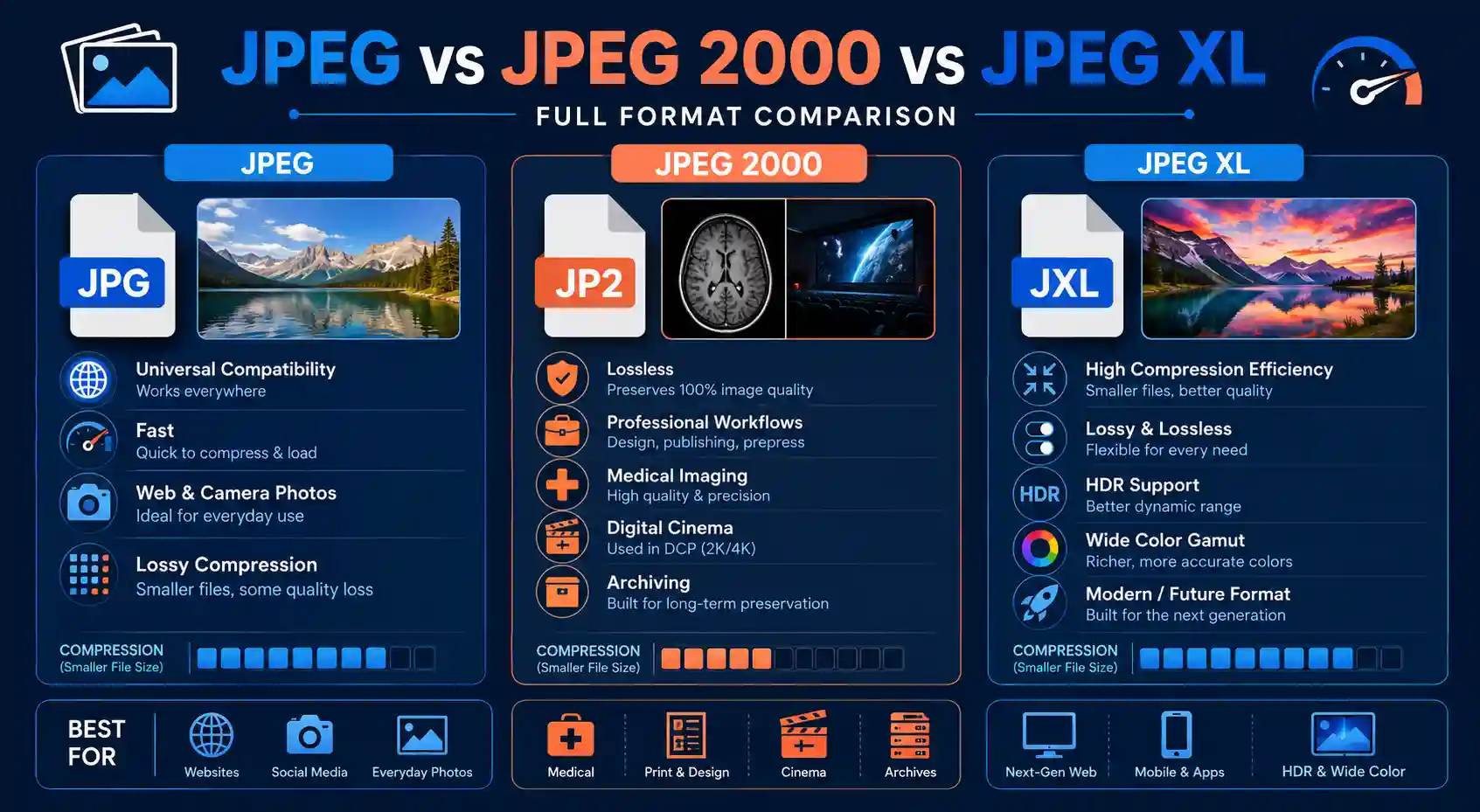
If you work with photos, scans, web graphics, or archival files, you've probably run into all three of these formats without fully understanding what separates them. JPEG has been the default for three decades, JPEG 2000 quietly runs entire medical imaging and cinema pipelines, and JPEG XL is the newer format trying to replace both while fixing their long list of complaints. Picking the wrong one costs you either file size, quality, or compatibility — sometimes all three at once.
For most everyday use, standard JPEG still wins on compatibility, JPEG 2000 wins on lossless archival and professional workflows, and JPEG XL wins on raw compression efficiency and future-proofing — but browser and software support still varies enough that the fastest practical fix for converting between any of them is a browser-based converter rather than installing dedicated desktop software.
This guide brings every angle of that comparison together in one place — the technical foundations, real-world printing and web use cases, how each format stacks up against PNG and against each other, and even the mobile conversion workflow — so you get a complete answer here, with links to dedicated deep-dive articles if you want to go further on any single angle.
JPEG vs JPEG 2000 vs JPEG XL | Full Format Comparison
How JPEG, JPEG 2000, and JPEG XL Actually Work
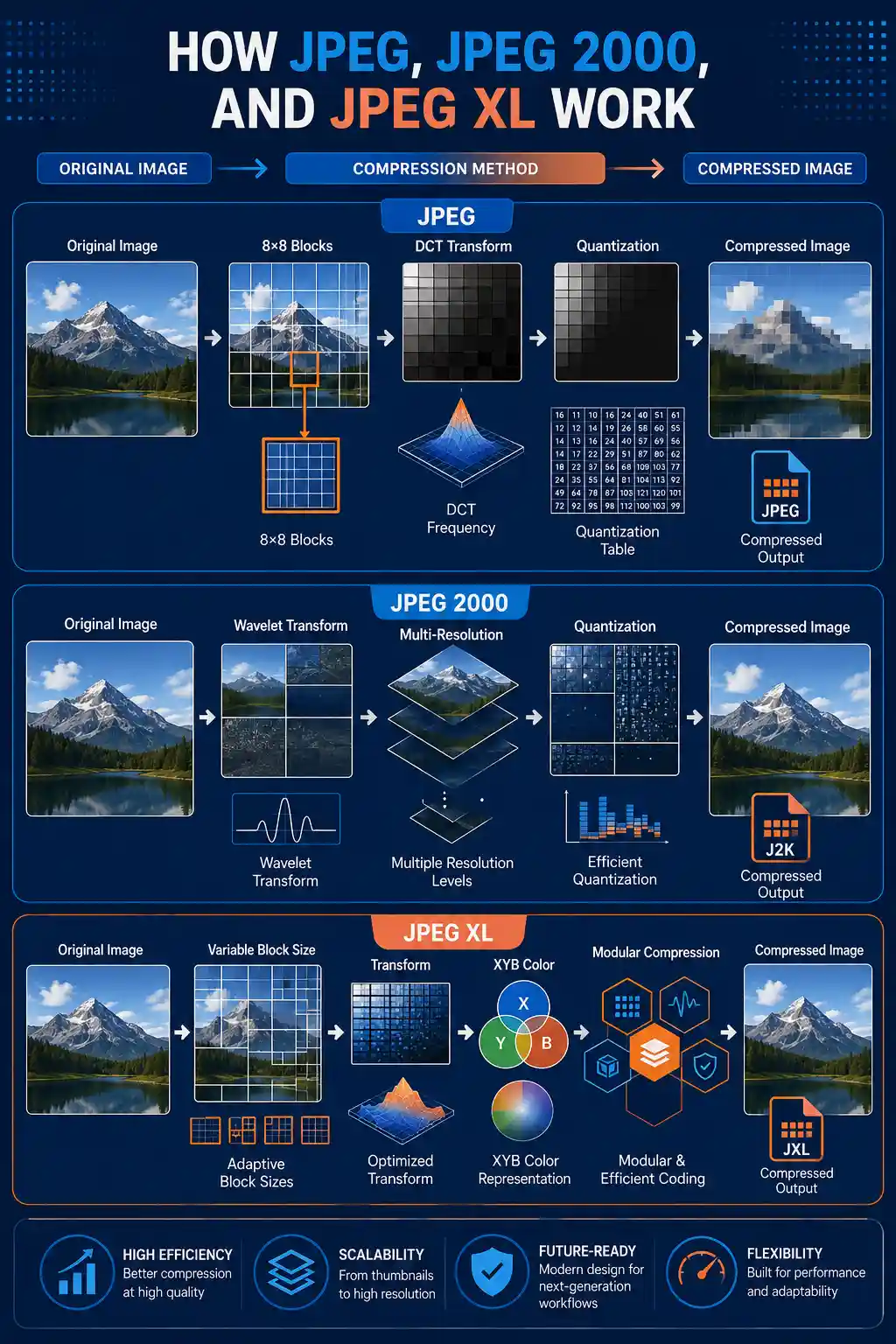
Classic JPEG, standardized in 1992, compresses images using the discrete cosine transform (DCT). It breaks an image into 8x8 pixel blocks, converts each block into frequency data, and discards the frequencies the human eye is least sensitive to. This is why JPEG is fast and universally supported, but also why it produces the blocky "ringing" artifacts you see around sharp edges at low quality settings — the 8x8 block boundaries become visible once you push compression too hard.
JPEG 2000, finalized in 2000, replaced DCT with wavelet-based compression. Instead of chopping the image into fixed blocks, wavelet transforms analyze the whole image at multiple resolution levels simultaneously. The practical result is smoother degradation — instead of blocky artifacts, over-compressed JPEG 2000 images get slightly blurry, which most viewers find less objectionable. JPEG 2000 also natively supports lossless compression, region-of-interest encoding, and progressive resolution scaling, which is exactly why it became the backbone of DICOM medical imaging and the digital cinema package (DCP) standard used in movie theaters.
How JPEG, JPEG 2000, and JPEG XL Actually Work
JPEG XL, standardized in 2021 through ISO/IEC 18181, is the newest of the three. It uses a modular architecture combining a variable block-size transform (loosely descended from Google's PIK project) with an integer XYB color space designed to match human perception more closely. JPEG XL can losslessly recompress an existing JPEG file to roughly 20% smaller with zero additional quality loss — a feature neither JPEG nor JPEG 2000 offers — and it supports both lossy and lossless modes, animation, HDR, and wide color gamuts in a single format.
Format
Compression Method
Best Fit
JPEG
DCT, block-based, lossy
Universal web and camera photos
JPEG 2000
Wavelet-based, lossy or lossless
Medical imaging, cinema, archiving
JPEG XL
Modular transform, lossy or lossless
Next-gen web, photography archives
At equivalent visual quality, JPEG 2000 and JPEG XL both typically produce files 30–60% smaller than standard JPEG, but neither format is supported as broadly by browsers, cameras, and older software.
The Fastest Way to Convert Between Formats
Understanding the theory is one thing — actually getting a file from one format to another without installing Photoshop, GIMP, or a command-line library is another. This is where a browser-based tool saves real time, especially if you're converting a single file or a small batch and don't want to manage codec plugins.
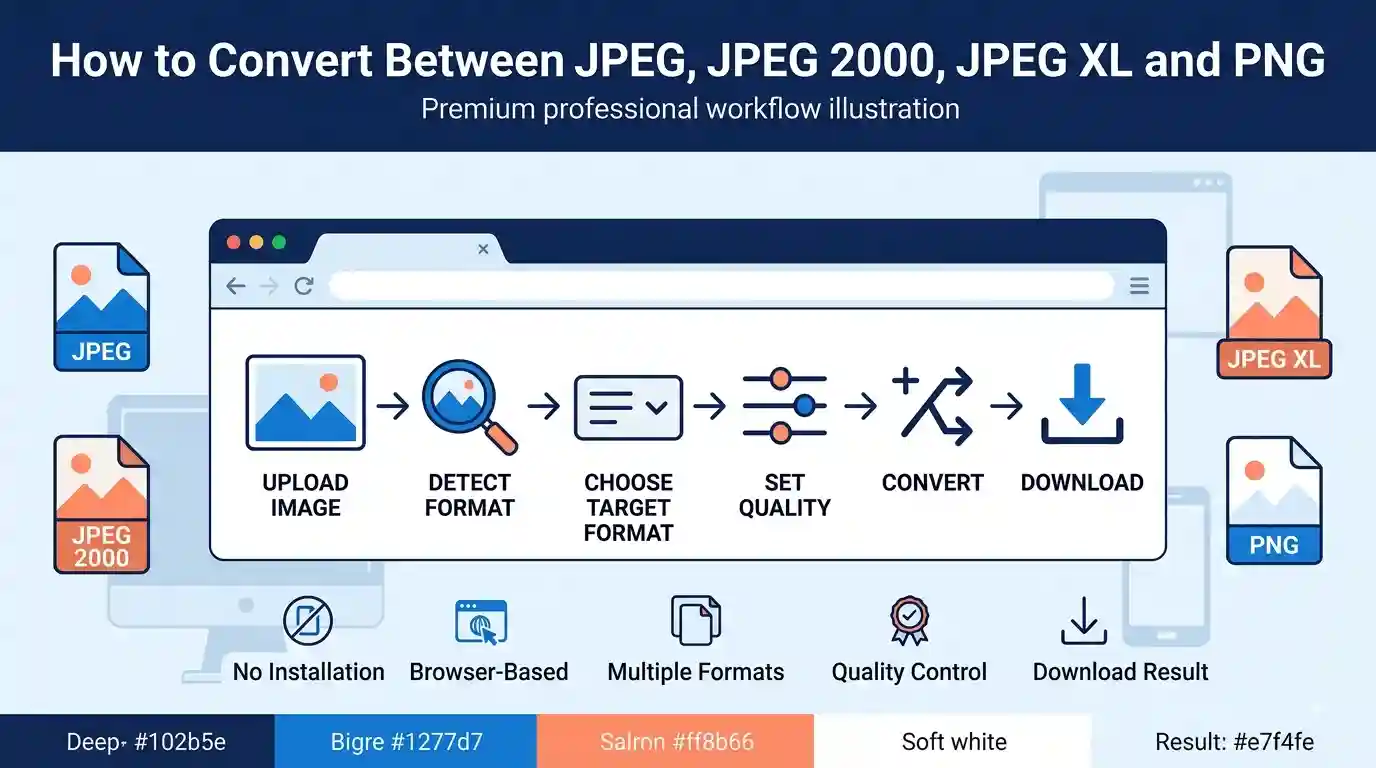
The Best Free Image Converter handles JPEG, JPEG 2000, JPEG XL, and PNG conversions directly in your browser. Here's the actual workflow:
Open the converter and drag your file onto the upload zone — it highlights blue when the file is recognized as a valid image.
A thumbnail preview appears within a second or two, along with the detected source format and file size.
Pick your target format from the dropdown. For lossy formats, a quality slider appears — drag it and watch the estimated output size update live.
Click convert. A progress bar fills, and for larger files (10MB+) this can take a few extra seconds since wavelet and modular encoders are computationally heavier than basic DCT.
Click the download button that replaces the progress bar once conversion finishes.
The Fastest Way to Convert Between Formats
It fits this particular topic well because it's one of the few free browser tools that actually supports JPEG 2000 and JPEG XL as both input and output — most converters only handle the older JPEG/PNG pair. The honest limitation: very large JPEG 2000 files (200MB+, common in scanned archival TIFFs converted upstream) can be slow to process in-browser since there's no server-side batch queue, so huge archival jobs are still better suited to desktop software.
Troubleshooting tip: if a converted JPEG XL file won't preview in your browser afterward, that's not a broken file — it's your browser. JPEG XL native display support is still inconsistent across major browsers as of 2026, so open it in an app that explicitly supports the format, or convert it back to JPEG for a quick visual check.
JPEG 2000 vs JPEG
The core trade-off between these two comes down to one question: do you need lossless quality and scalability, or do you need universal compatibility? JPEG 2000 wins decisively on the first. Because it uses wavelet compression instead of block-based DCT, it can compress an image losslessly at roughly half the file size of an uncompressed TIFF, while standard JPEG's lossless mode barely exists in practice and its lossy mode always throws away data.
Where JPEG still wins is everywhere that matters for everyday use. Every camera, phone, browser, social platform, and image library reads JPEG natively. JPEG 2000 requires specific codec support — many web browsers still can't display a .jp2 file without a plugin or conversion step, which is exactly why it never became a consumer web format despite being technically superior in many respects.
A concrete example: a 24-megapixel scan saved as JPEG 2000 lossless might run 18–22MB, while the same scan as a high-quality JPEG (quality 90) runs 6–8MB but has already discarded fine chroma detail permanently. For a photo you're posting online, that's an acceptable trade. For a museum digitizing a manuscript, it isn't.
If you want the complete breakdown of bitrate behavior, resolution scaling, and archival use cases, the dedicated comparison at JPEG 2000 vs JPEG goes deeper into every one of these numbers.
JPEG vs JPEG2000 for Printing: Which Format Is Better?
Print is one of the few areas where JPEG 2000's technical advantages translate into a genuinely visible difference. Printers, especially large-format and fine-art printers, are unforgiving of compression artifacts — a blocky JPEG that looks fine on a phone screen can show obvious 8x8 block edges once enlarged to a 16x20 inch print.
JPEG 2000's progressive resolution structure also means a single master file can serve multiple print sizes without re-encoding, since the format stores the image as layered resolution levels rather than one fixed grid. Professional print labs and stock photo archives that handle large-format output frequently keep a JPEG 2000 master and export JPEG only for proofs or web previews.
That said, most consumer and small-business printing — photo prints up to roughly 8x10 inches, brochures, standard documents — shows no visible difference between a high-quality JPEG (quality 95+) and JPEG 2000, because print resolution and viewing distance mask the artifacts that would otherwise be visible on screen. The gap only really opens up at large formats or when the source image is already compressed multiple times.
A photographer preparing a gallery-sized print from a JPEG 2000 master, for instance, retains far more tonal gradation in skies and skin tones than the same image would after repeated JPEG re-saves. For a full printing-specific breakdown including DPI thresholds and lab workflow recommendations, see JPEG vs JPEG2000 for Printing.
JPEG2000 vs JPEG XL
This is the comparison most likely to matter for anyone choosing a format for a new project today, since both are technically capable successors to old-school JPEG. JPEG XL generally compresses more efficiently at equivalent quality — independent bitrate testing across photographic test sets has consistently shown JPEG XL producing smaller files than JPEG 2000 at matched PSNR (peak signal-to-noise ratio) scores, particularly in the 0.5–1.0 bits-per-pixel range common for web photography.
JPEG XL also has a feature JPEG 2000 lacks entirely: lossless JPEG transcoding. You can take an existing .jpg file and losslessly repackage it as .jxl, typically shrinking it by around 20% with a fully reversible process — useful for anyone sitting on decades of JPEG archives who wants space savings without any quality risk.
JPEG 2000 still holds ground in one area: entrenched professional pipelines. Medical imaging (DICOM), digital cinema (DCP), and geospatial/satellite imagery standards were all built around JPEG 2000 years before JPEG XL existed, and switching an established regulatory-compliant pipeline is a much bigger undertaking than switching a photography workflow.
Encoding speed also differs meaningfully — JPEG XL's reference encoder is generally faster at high-effort lossy settings than JPEG 2000's wavelet pipeline, which matters if you're batch-processing thousands of images rather than a handful of archival masters. For the full bitrate and PSNR comparison tables, read JPEG2000 vs JPEG XL.
JPEG XL vs PNG
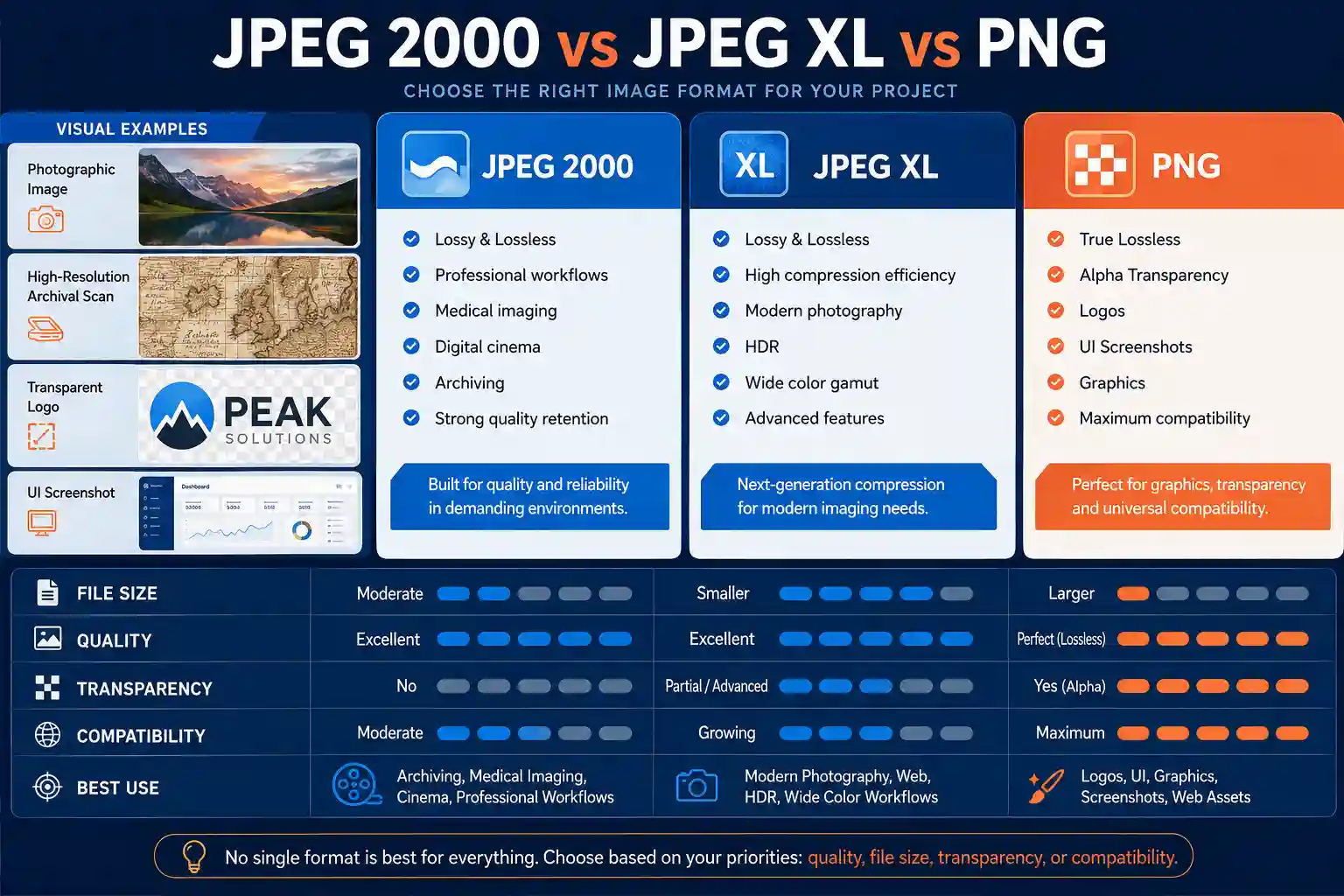
PNG remains the go-to format for anything requiring true lossless output with transparency — logos, UI screenshots, graphics with hard edges and flat color regions. It uses DEFLATE compression, which is lossless but not especially efficient for photographic content, often producing files several times larger than a comparable lossy JPEG XL image.
JPEG XL's lossless mode changes the calculation. Because it uses a more sophisticated prediction and entropy coding scheme than PNG's DEFLATE, JPEG XL lossless files routinely come in 30–50% smaller than PNG for the same pixel-perfect image, while still supporting full alpha transparency. For a website icon set or a screenshot-heavy documentation site, that's a meaningful bandwidth saving with zero quality trade-off.
The catch is support. PNG works everywhere — every browser, every OS, every image viewer built in the last 25 years. JPEG XL, as of 2026, is still inconsistently supported across major browsers, meaning a website relying on JPEG XL for transparency needs a PNG or WebP fallback for visitors on unsupported browsers, adding complexity that PNG alone doesn't require.
JPEG XL vs PNG
A practical example: a 1200x800 screenshot with sharp text and UI elements might run 380KB as PNG, but 190–220KB as lossless JPEG XL — nearly half the size with an identical, pixel-for-pixel result. For the full transparency, alpha-channel, and browser-support breakdown, see JPEG XL vs PNG.
JPEG 2000 vs JPEG Stereo
JPEG Stereo is a less common extension aimed at encoding stereoscopic (dual-eye, 3D) image pairs efficiently by exploiting the redundancy between the left and right eye views, rather than compressing each frame independently as a standalone JPEG. JPEG 2000, by contrast, was never designed with stereoscopic pairing in mind — it compresses a single image extremely well but has no built-in mechanism for cross-view redundancy.
In practice, this means a stereo image pair encoded with a stereo-aware method can be notably smaller than storing two independent JPEG 2000 files, because a large percentage of the pixel data between the two eye views is nearly identical except for a horizontal disparity shift. JPEG 2000's strength — wavelet-based lossless and progressive encoding — remains valuable for archiving a single high-fidelity master of one of the two views, but it doesn't solve the stereo redundancy problem on its own.
This is a narrow, specialized comparison compared to the others in this guide — most readers dealing with everyday photography or web images will never touch stereo-specific encoding — but for VR content pipelines, 3D cinema archiving, or stereoscopic medical imaging, the distinction matters a great deal for storage costs at scale.
For the complete technical walkthrough of stereo pair encoding versus standard JPEG 2000 archiving, see the dedicated guide at JPEG 2000 vs JPEG Stereo.
How to Convert a Photo to JPEG on Mobile for Free
A huge share of format-conversion needs today aren't archival or professional at all — they're someone on their phone trying to turn a HEIC photo, a screenshot, or a downloaded JPEG 2000 scan into a plain JPEG that any app will accept. The good news is you don't need a dedicated app for this.
Open your phone's browser, go to the converter, and tap the upload area — on mobile this opens your photo library or camera directly rather than a file browser. Select the image, wait for the thumbnail to appear, choose JPEG as the target format, and tap convert. The download saves straight to your photos or downloads folder depending on your phone's settings, with no app install and no account required.
This matters most for iPhone users specifically, since iOS defaults to saving photos as HEIC, a format many older apps, printers, and non-Apple platforms still don't accept. Converting a batch of vacation photos from HEIC to JPEG before uploading them to a print service or an older web form is one of the single most common real-world conversion tasks people run into.
One thing worth knowing before you convert an already-heavily-compressed image again: repeatedly re-saving as JPEG compounds quality loss each time, since JPEG's DCT compression is not reversible. If your source is already a JPEG, converting it "to JPEG" again mainly helps with things like resizing or changing the quality level, not recovering lost detail. For the complete step-by-step mobile guide with screenshots, see How to Convert Photo to JPEG in Mobile for Free.
JPEG Stereo vs JPEG
Setting JPEG Stereo against plain single-image JPEG highlights exactly what stereo-aware encoding is solving for: redundancy across two views rather than compression efficiency within one. A standard JPEG file has no concept of a "paired" image — every file is compressed completely independently, which is fine for a single photo but wasteful for a matched stereo pair where the two frames share the vast majority of their visual content.
If you compressed a stereo pair as two ordinary JPEGs, you'd pay the full file-size cost twice, even though a large portion of the right-eye image can be predicted from the left-eye image plus a disparity map. Stereo-aware schemes exploit that overlap, which is why they can beat two independent JPEG files by a wide margin on combined storage size for the same visual quality.
The trade-off is tooling and adoption. Plain JPEG is supported by literally every image pipeline in existence; stereo-specific encoding requires specialized software and is really only relevant to people working directly with stereoscopic capture equipment or legacy 3D content archives — it isn't something a general photography or web workflow needs to worry about.
For anyone actually working with stereo pairs today, the practical decision usually comes down to whether your pipeline already has stereo-aware tooling available; if not, falling back to two well-optimized standard JPEGs (or JPEG XL files, given their better single-image compression) is often the pragmatic choice. The full comparison lives at JPEG Stereo vs JPEG.
MIME Type for PNG
Every image format has a MIME type that tells browsers and servers how to interpret the file, and for PNG that type is image/png. This might sound like a small technical detail, but it matters more than most people realize — if a server misconfigures the MIME type, browsers can refuse to render the image, download managers can mishandle the file, and some CMS platforms will silently reject an upload that doesn't match the expected type.
The MIME type is separate from the file extension. A file can be named image.png but served with the wrong Content-Type header, and vice versa — some misconfigured servers serve .jpg files with image/png headers after a bad conversion step, which can cause subtle rendering bugs in strict parsers. Checking the actual Content-Type header (not just the filename) is the reliable way to confirm what a server thinks a file is.
This matters directly for anyone building or maintaining a website: if you're serving converted images dynamically, getting the MIME type wrong for PNG, JPEG, or JPEG XL output can cause images to fail to load in certain browsers even though the underlying file is perfectly valid. For JPEG XL specifically, the registered MIME type is image/jxl, and inconsistent browser support means some browsers won't render it correctly even with the right header.
For the complete reference on PNG's MIME type, related headers, and common misconfiguration issues, see MIME Type for PNG.
The Most Notable Advantages of JPEG
Despite being over three decades old, JPEG's advantages are genuinely still relevant, not just legacy inertia. Universal compatibility is the biggest one — every browser, camera, phone, printer, and image editor built since the early 1990s reads JPEG without any plugin, conversion, or fallback logic required.
Encoding and decoding speed is another real advantage. Because JPEG's DCT-based compression is computationally simple compared to wavelet or modular transforms, it decodes extremely fast even on low-power devices — this is part of why JPEG remains the default capture format for most digital cameras and phones, where battery life and processing speed matter during continuous shooting.
File size flexibility is a third genuine strength: JPEG's quality slider gives you fine-grained control from near-lossless (quality 95+) down to heavily compressed thumbnails (quality 20 or below), letting you tune the trade-off precisely for bandwidth-constrained situations like email attachments or slow mobile connections.
To be fair to the format's real limitations alongside these strengths, the dedicated JPEG Advantages and Disadvantages guide covers the downsides in full, and the complete list of advantages with benchmarked examples is at Most Advantages of JPEG.
JPG vs JPEG 2000
A quick clarification before the comparison: JPG and JPEG are the exact same format — .jpg is simply a three-letter extension left over from older Windows filesystems (like FAT32 or MS-DOS) that couldn't handle four-letter extensions. There is no technical difference between a .jpg and a .jpeg file today.
With that settled, the actual comparison is identical to standard JPEG vs JPEG 2000: block-based DCT compression against wavelet-based compression, universal support against specialized professional support, and lossy-only-in-practice against genuine lossless capability. JPEG 2000 wins on quality retention and archival integrity; JPG wins on being readable by literally everything.
Where this distinction trips people up in practice is file management — someone might rename a .jp2 file to .jpg expecting it to suddenly become compatible, which doesn't work, since renaming an extension doesn't change the underlying compressed data format. Actual conversion, not renaming, is required to move between them.
For the complete side-by-side including bitrate charts and compatibility tables, see JPG vs JPEG 2000.
Content Type JPEG
Similar to the PNG MIME type discussion earlier, JPEG's registered content type is image/jpeg. This is the value sent in the HTTP Content-Type header whenever a server delivers a JPEG file, and it's also the value used in email attachments, API responses, and file-upload validation logic across countless web applications.
Getting this content type right matters more in automated pipelines than most developers expect. A form that validates uploads by checking the Content-Type header rather than actually inspecting the file bytes can be tricked by a mismatched or spoofed header — which is one reason security-conscious systems validate the actual file signature (the "magic bytes" at the start of the file) rather than trusting the declared content type alone.
For everyday use, this mostly surfaces as a debugging issue: if a JPEG image mysteriously won't display in a browser despite the file itself opening fine locally, checking whether the server is sending the correct image/jpeg content type is one of the first things worth ruling out, ahead of assuming the file itself is corrupted.
The full reference on JPEG's content type, related headers, and common server misconfigurations is available at Content Type JPEG.
JPEG vs PNG
This is the oldest and most common format decision on the web, and it comes down to one core question: does your image have photographic gradients, or flat colors and sharp edges? JPEG's DCT compression handles smooth photographic tone transitions well but struggles with hard edges and text, producing visible ringing artifacts around sharp boundaries. PNG's lossless DEFLATE compression does the opposite — it handles flat colors and sharp edges perfectly but produces much larger files for photographic content.
A concrete comparison: a 1920x1080 photograph of a landscape might be 350KB as a quality-85 JPEG but over 2.5MB as PNG, because PNG has to losslessly encode every subtle gradient in the sky and foliage. Flip the content — a screenshot of a spreadsheet with white background and black text — and PNG might run 120KB while JPEG, fighting to smooth compression artifacts around every character edge, actually looks worse and isn't meaningfully smaller.
Transparency is the other deciding factor: PNG supports a true alpha channel for transparent and semi-transparent pixels, which JPEG has never supported in any standard implementation. Any logo, icon, or overlay graphic that needs to sit on top of varying backgrounds needs PNG (or newer alternatives like WebP or JPEG XL) rather than JPEG.
If you're converting between the two for a website specifically, doing it without quality loss on the PNG side is worth getting right — the Free PNG to JPEG Converter Without Compression tool is built for exactly that. For the full content-type breakdown covering website performance specifically, see JPEG vs PNG, and for a deeper look at how JPEG 2000 fits into this same comparison, the Difference Between JPEG and JPEG2000 guide covers that three-way angle in full.
Quick Verdict Summary
Subtopic
Quick Verdict
Best For
JPEG 2000 vs JPEG
JPEG 2000 for quality, JPEG for compatibility
Archiving vs everyday sharing
JPEG vs JPEG2000 for Printing
JPEG 2000 for large-format only
Fine-art and gallery prints
JPEG2000 vs JPEG XL
JPEG XL usually more efficient
New photography projects
JPEG XL vs PNG
JPEG XL smaller, PNG more compatible
Icons, screenshots, UI graphics
JPEG 2000 vs JPEG Stereo
Stereo-aware encoding wins for pairs
3D and VR content
Mobile JPEG Conversion
Browser tool beats apps
HEIC-to-JPEG on the go
JPEG Stereo vs JPEG
Depends on pipeline tooling
Specialized 3D workflows
MIME Type for PNG
image/png, check headers not filenames
Developers and server configs
JPEG Advantages
Speed and compatibility still win
Cameras, phones, email
JPG vs JPEG 2000
Same format vs a different one
Clarifying naming confusion
Content Type JPEG
image/jpeg, validate actual bytes
Server and upload debugging
JPEG vs PNG
JPEG for photos, PNG for graphics
Websites and general use
Frequently Asked Questions
Frequently Asked Questions
Is JPEG 2000 or JPEG XL better?
JPEG XL generally compresses more efficiently at equal visual quality and adds features like lossless JPEG transcoding, but JPEG 2000 remains deeply embedded in medical, cinema, and geospatial pipelines where switching formats isn't a simple decision.
Is JPEG XL better quality than JPEG?
At matched file sizes, JPEG XL consistently preserves more detail and produces fewer visible compression artifacts than standard JPEG, thanks to its more advanced transform and perceptual color space.
Which is better, JPEG or JPEG 2000?
JPEG 2000 wins on quality and lossless capability; JPEG wins on universal compatibility and speed. The right answer depends entirely on whether your priority is archival fidelity or everyday accessibility.
Is JPEG 2000 still used?
Yes — it remains the standard for DICOM medical imaging, digital cinema packages in movie theaters, and various geospatial and satellite imagery systems, even though it never gained traction as a consumer web format.
What are the disadvantages of JPEG 2000?
Limited browser and software support, slower encoding compared to standard JPEG, and larger file sizes than JPEG for casual, low-fidelity use cases are the main drawbacks.
Which JPEG quality is best?
For most photographic web use, quality 80–90 offers the best balance of visual fidelity and file size; quality 95+ is closer to visually lossless but with diminishing returns on file size savings.
What is JPEG XL?
JPEG XL is a modern image format standardized in 2021 that supports both lossy and lossless compression, animation, HDR, and wide color gamuts, designed to outperform both JPEG and PNG in a single format.
Why is my JPEG so blurry?
This usually happens from repeated re-saving at low quality settings, upscaling a small image beyond its original resolution, or the source photo itself being out of focus before compression was ever applied.
Is JPEG XL better than PNG?
For lossless images, JPEG XL typically produces files 30–50% smaller than PNG at identical pixel-perfect quality, though PNG still has far broader software and browser support.
What happened to JPEG 2000?
It never achieved mainstream web adoption due to limited browser support and higher computational cost, but it succeeded in specialized professional fields like medical imaging and cinema, where it remains standard today.
What is a JPEG 2000 file?
A JPEG 2000 file (usually .jp2 or .jpf) is an image compressed using wavelet-based transforms rather than the block-based DCT method used by standard JPEG, enabling both lossy and lossless compression modes.
Which is better, JPEG 2000 or JPEG XL?
JPEG XL edges out JPEG 2000 in raw compression efficiency and modern feature support for most new projects, while JPEG 2000 remains the safer choice inside existing regulatory or industry-standard pipelines already built around it.
Conclusion
Across every angle covered here — theoretical compression methods, printing outcomes, web performance, mobile workflows, MIME types, and even specialized stereo encoding — the same pattern holds. JPEG wins on universal compatibility and speed, JPEG 2000 wins on lossless archival quality and entrenched professional pipelines, and JPEG XL wins on raw efficiency and modern features, at the cost of still-maturing browser support.
There's no single "best" format among the three; there's only the best format for what you're actually doing with the file, whether that's archiving a scanned document losslessly, printing a large-format photo, or shipping a lightweight image to a website. The comparisons in this guide, together with the linked deep-dive articles, cover the full decision space so you don't have to guess.
Whichever format you land on, actually converting between them doesn't need to involve installing software or command-line tools — the Best Free Image Converter handles JPEG, JPEG 2000, JPEG XL, and PNG conversions directly in your browser, so you can move between formats as your project's needs change.
Application offline!
Your experience on this site will improve by allowing cookies